The purpose of this document is to provide a comprehensive guide to best practices and key considerations for designing API integrations. It should be referenced throughout the design and development process to help you design reliable, scalable, and maintainable solutions.
Files
File types
Smartling supports many file types. Some integrations will naturally lead toward one file type or another based on the options readily available in the platform. If creating the files from scratch or given the choice, we recommend using the JSON file type as it provides the most flexibility with supported directives.
File naming conventions
File names (fileUri) in Smartling are searchable, so it is important to define a naming convention that will easily enable users to find content in Smartling.
File names should include:
- User-friendly name for the asset (may need to be trimmed). This could be the title of the asset or another attribute that is visible to the end user.
- (Optionally) An asset type
- Unique identifier for the asset
Example: The Best Surfboard-PRODUCT-123563.json
For platforms that use a path or tree structure:
- Asset path (may need to be trimmed)
- Asset ID
Example: /content/marketing_site/product/features/en.json
In these types of structures, the asset itself is often not unique, so including the entire path ensures uniqueness. It's also important to ensure that if trimming of the path does occur, it doesn't remove the most relevant part of the path (i.e., the file/asset name).
For this structure, consider how namespaces should be determined—for example, if string sharing is desired for the same file in different branches or other variable parts of the file URI.
Keep in mind:
- Maximum
fileUrilength is 512 characters. Some parts may need to be trimmed, especially if the file path is part of thefileUri. - All UTF-8 characters are supported, including extended unicode symbols and emojis.
-
fileUrivalues are case-insensitive.
File contents
As a best practice, Smartling recommends sending the entire set of keys for an asset every time translation is requested, as opposed to only sending changed or updated content (i.e., delta content). Smartling will detect if strings have changed or are new. Any strings that are unchanged will remain unaffected in the platform. This approach allows for better tracking of strings in the platform.
If delta files are sent, they need to be uniquely named so as not to remove strings that were previously sent for translation. This makes it difficult to track changes to existing strings, instead creating multiple copies.
HTML content
We recommend the integration provide a way to identify which strings/keys contain HTML content. Smartling will parse these strings as HTML, breaking them into smaller translation units, which allows for better TM leverage. When sending the content to Smartling, use the string_format_paths directive to identify keys containing HTML.
Sample JSON file structure
Below is a sample JSON file structure. While Smartling is very flexible and can accommodate a wide variety of file structures, formatting the file in specific ways can make it easier to identify which keys need to be translated and other parsing requirements.
{
  "smartling": {
    "variants_enabled": "true",
    "translate_paths": [
    {
      "path": "/values/*/text",
      "key": "/values/*/variant",
      "instruction": "/*/instruction",
      "character_limit": "/*/character_limit"
    }
  ],
  "string_format_paths": "html: [values/htmlValue], txt: [values/textValue]"
},
"values": [
  {
    "key": "store.checkout.key1",
    "textValue": {
      "text": "A discount has been applied to this order. You can't add another discount.",
      "variant": "store.checkout.key1",
      "instruction": "these are the instructions",
      "character_limit": 50
    }
  },
  {
    "htmlValue": {
      "text": "<p><strong style=\"text-transform:uppercase\">%{code}</strong>discount code
      isn't valid for the items in your cart</p><p>Please enter a new code</p>",
      "variant": "store.checkout.key2",
      "instruction": "these are some other instructions",
      "character_limit": 100
    },
    "key": "store.checkout.key2"
  }
 ]
}
Directives used for this example: These directives can either be specified inline (most directives) as shown in the sample above or specified through the API. See documentation for details on each directive. Note that the directives shown here are specific to JSON. Similar directives are available for some (but not all) other file types.
-
string_format_paths:html: [values/htmlValue], txt: [values/textValue]- Tells Smartling which paths should be parsed in which format. Useful for enabling HTML parsing.
-
translate_paths:[{\"path\":\"/values/*/text\",\"key\":\"/values/*/variant\",\"instruction\":\"/*/instruction\",\"character_limit\":\"/*/character_limit\"}]- Gives the path to the translatable strings, keys, and instructions
- Optionally, you can specify a character limit
-
variants_enabled:true- Determines whether variants are used
-
namespace- This directive can only be set through the API, see Namespaces and Variants section for further details.
Content parsing
Directives
Content parsing in Smartling is controlled using directives. Specific directives are noted throughout this document. The available directives are based on the specific file type used for the integration.
Notranslate fields
A common use case for an API integration is that certain fields in the source system should not be translated and therefore not sent to Smartling.
The integration must take into account:
- Fields/attributes that should never be translated.
- Example: Fields that contain URLs, image names, or IDs.
- Fields/attributes that the user should be allowed to configure whether they should be translated.
- The integration should provide a way for the user to identify fields that should be excluded from translation (e.g., a freeform text area).
- Most commonly the system administrator is configuring this for the entire integration rather than content authors, and this requires a system wide configuration (and possibly UI). Occasionally the content authors will need to be able to specify on a per-asset basis. This is less common.
Fields that should not be translated can be handled in one of three ways:
-
Recommended approach: Include them in the file sent to Smartling but with a path that is different from what is looked for in the
translate_pathsdirective. This prevents the strings from being ingested. - Do not include them in the files sent to Smartling.
- In the case of HTML content,
notranslatetags can be used.
Placeholders
Another common use case is when a string that should not be translated is embedded in a larger string which does require translation. This is common when a variable is used as part of a larger string.
In this case, there are two ways to handle this:
-
Recommended approach: Use placeholders. This is required for cases where variables are being used.
Examples:Source String Example String that contains a placeholder You will love Product A You will love {{productName}} You will love Product B Buy 2 more to receive $100 off Buy {{number}} more to receive {{amount}} off Buy 1 more to receive $50 off An added benefit of using placeholders is that it can reduce the amount of strings requiring translation by collapsing multiple strings into a single string.
The integration should consider the data that is sent for translation.
- Where should placeholders be included?
- Is there a need to allow the content creator to specify when to use placeholders? How can this be achieved technically?
- What placeholder format(s) will be used?
Refer to the specific file type documentation for information on what placeholder formats are supported out-of-the-box (OOTB) for each file type.
- Non-programmatically through glossary entries. This fits some use cases where the set of phrases not to translate are well known and can be clearly defined. While this approach does not require any development effort, it is not a good fit for all use cases.
- This can be useful when end users are generating content and may not always know which parts of a string should remain untranslated. For example, if someone is writing a restaurant description such as, "Welcome to Restaurant ABC...," the restaurant name should stay in its original form, even though it appears within a larger block of text. In cases like this, glossary entries can be a good solution if you know which untranslatable terms will appear in the content and these terms are generally nouns, as adding other parts of speech is not recommended and can cause issues with features such as Glossary Term Insertion.
Custom placeholders
Sometimes there is a need for the integration to allow a configuration option for custom placeholders. This is typically a plain text field where an admin can enter the custom placeholder format. This provides the ability to use custom placeholder format(s) that can be easily modified based on business requirements. These should be sent to Smartling using the custom placeholder directive.
Keep in mind that for the JSON file format, adding a custom placeholder format will override the OOTB placeholder formats. Therefore, to support both, the custom placeholder format expression must be inclusive of any needed OOTB formats as well.
Namespaces & variants
Smartling has a concept of string sharing where strings with the same text within the same namespace share a translation.
You can think of a Namespace as a container of strings. Using the API, you can define different namespaces (containers) of strings. By default, the fileUri is the namespace if none is specified.
String Variants are an additional optional feature that allows for different translations of the same source text. Namespaces can be used with or without variants enabled.
At a high level, namespaces control separation of strings at the namespace level, while variants allow for separation of strings within a namespace.
It is important to note that Smartling's SmartMatch feature can be used across namespaces and variants, allowing translations to be reused. This means you don't need to pay to have the same source text translated more than once.
Approaches to namespaces
Decisions around file naming conventions and namespace creation are often closely tied together. To make this decision, the underlying data structure of the CMS should be considered. There are two general approaches that Smartling recommends:
Namespace Approach 1: Namespaces for each unique asset
This approach generally works best for systems that store strings in assets that can be uniquely identified with an ID. A namespace is created for each unique asset and includes the ID of that asset. Do not include user-supplied attributes or attributes that could change over time, such as a name or title.
Each namespace can be assigned to one or more files.
Examples: PRODUCT_123, PRODUCT_456, PAGE_789, PAGE_1011
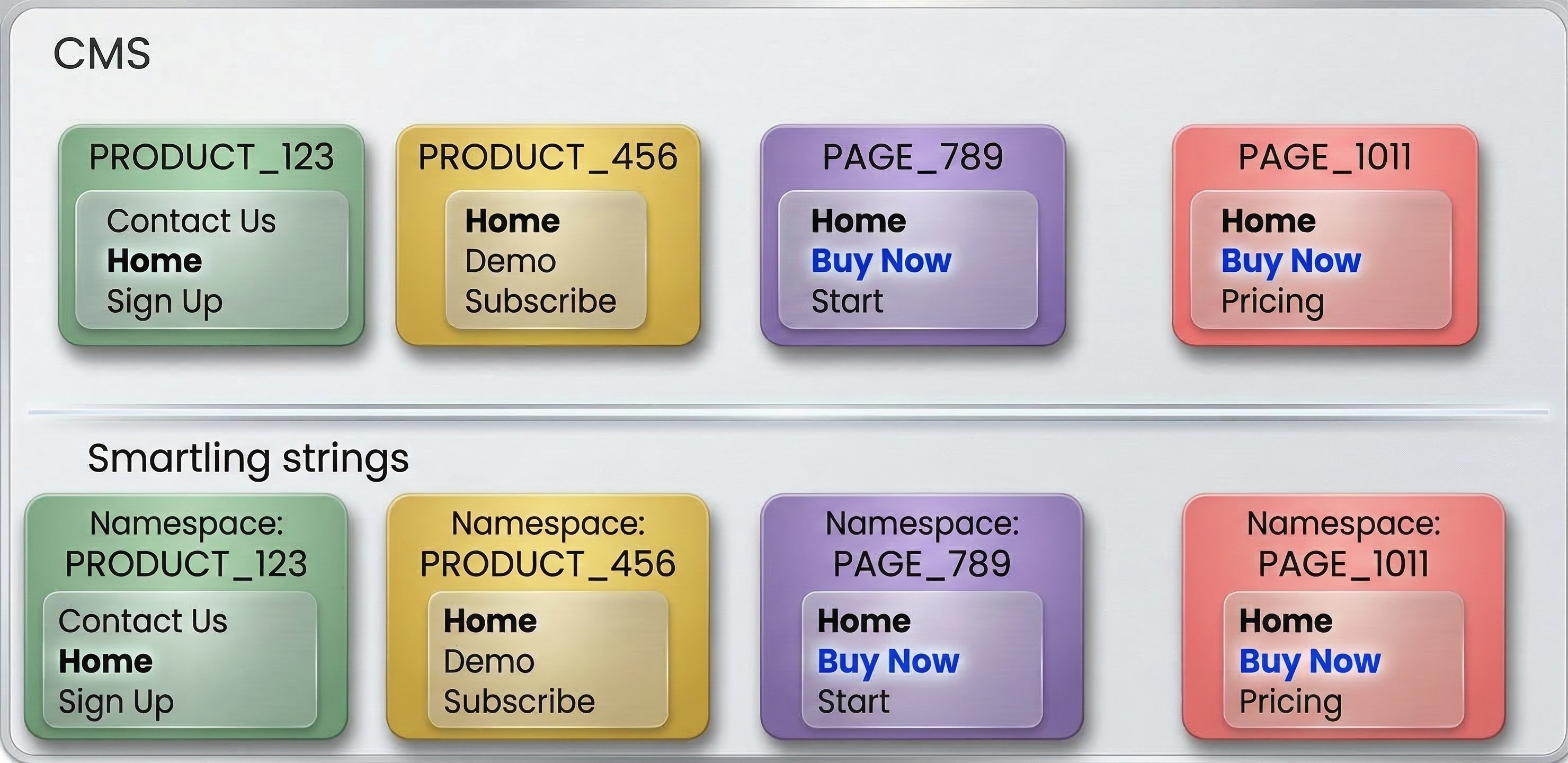
Namespace Approach 2: File-based
This approach generally works best for systems that store strings in path-based assets. These systems often contain branches or other unique identifiers to distinguish versioning between assets.
When using the file path as part of the fileUri naming convention, it is typically recommended to remove the branch (or other versioning identifier) from the path when specifying the namespace.
Consider the following example where two versions of a file exist in different branches:<branch123>/content/marketing_site/product/features/en.json
<branch456>/content/marketing_site/product/features/en.json
In this case, it is recommended to share strings between both versions of the file. The namespace could be set to exclude the specific branch: /content/marketing_site/product/features/en.json
Smartling's GitHub Connector uses this convention. You can find another example here.
No namespaces (not recommended)
This approach is not recommended as it does not allow adequate separation of strings to be translated differently depending on the context.
In this approach, all strings are shared across all files.
Variants
If the source content has keys, these are often used as string variants. Variants should be enabled when there is a need to separate translations for the same string within a file. Variants can be used with or without namespaces. An additional benefit is that keys/variants are searchable in Smartling.
Variants should not be used in the place of string instructions for the translator. Instead, use string instructions for this purpose.
API Flow
Smartling offers multiple APIs which can be used to get strings into Smartling for translation.
Job Batches
As a general best practice, we recommend the Job Batches API flow for the majority of integration use cases. Job Batches take care of asynchronous processes when uploading files and attaching them to jobs.
An alternative approach is using the Files API plus the Jobs API without Job Batches. In this approach, adding multiple files to a job requires polling at each step. The file is parsed asynchronously and can't be added to a job until it is completed. Adding a file to a job is also asynchronous, and the job can't be authorized until all background tasks are completed. This forces a third-party integration to poll for every file after every step.
Job Batches hides these asynchronous processes from third-party integrations. After it accepts the file, it processes this file through all steps up to the job authorization. As the Job Batches service utilizes internal Smartling events, it is more efficient than just polling files and jobs.
You can find a sample Postman collection for Job Batches here.
Strings API and jobs
It is also possible to upload strings directly into Smartling using the Strings API and then add them to a job. While this approach is possible, the Job Batches API flow outlined above is a better fit and is considered best practice. An exception may be when strings are stored in a database, where structuring them into a file may not be practical.
The Strings API has several limitations including:
- Limited directive support. For example, you cannot control entity escaping if a string is parsed as HTML.
- No ICU format support.
- Reduced content management in the dashboard, as strings are not grouped together the way they are in a file.
- No guarantee of ordering of strings.
- No ability to easily download from the dashboard, as strings do not live in a file.
- No way to delete or modify strings if the source content changes.
- Lower performance compared to the Job Batches API, and polling is required before adding strings to a job.
- No ability to include additional metadata, unlike file-based uploads where inline comments and metadata can provide useful context.
- Callback handling is less efficient. A separate callback is generated for each string unless job-level callbacks are used.
- No support for file rewrites, as there is no file associated with the content.
Translation request process
The integration should carefully consider: What triggers content to be sent to Smartling for translation? Is this automated or manually requested by the user?
If automated:
- Consider how to ensure the content is "complete" before triggering translation.
- Consider providing a manual override mechanism so content can be requested on demand for urgent needs or issue resolution.
If manual:
- Consider what the UI should look like for requesting translation.
- Determine what options the user should be allowed to override.
- Decide whether a user should be allowed to add content to an existing job.
UI Examples - Create New Job
UI Example - Add Content to an Existing Job
Smartling job creation
The integration should consider how and when Smartling jobs will be created.
If using the automated translation request process:
- Consider how frequently jobs should be created in Smartling.
- Real-time: Depending on volume, this may result in many small batches. Alternatively, new content can be added to an existing job within a defined timeframe (for example, a daily job).
- Batched / scheduled: Define the schedule and determine how it can be changed or overridden.
If using a manual translation request process:
- Users are typically allowed to specify a job name.
- Determine whether users should be able to add content to an existing job.
Job naming requirements
- Job names must be unique in Smartling.
- If a user attempts to create a job with a non-unique name, an error message should be shown.
- For automatically created jobs, define a naming convention that reliably produces unique names.
Authorization
The integration should carefully consider: How should content be authorized in Smartling?
Auto-authorization: Jobs are automatically authorized in Smartling.
- This can be done using the
authorizeparameter in the Create Job Batch API or the Authorize Job endpoint. - Content will be authorized for the default workflow for each locale, unless overridden by using the
localeWorkflowsparameter in the API call.
Manual authorization: Jobs are manually reviewed in Smartling before authorization.
- User can override the default workflow at the time of authorization.
Allow user to choose
- If users are manually requesting content, the request UI dialog should allow them to indicate whether the content should be automatically authorized for translation. This is only applicable for the manual translation request process.
- It is important to consider what the default value will be and whether there is a configuration option to control or override it.
UI Examples
Related and child assets
The integration should consider the entity structure of assets in the system and how assets may be related to each other.
Child assets
In a hierarchical or path-based structure, users may want to submit an asset and any children of that asset at the same time.
- Example: When submitting
/content/top_path/page1, allow/content/top_path/subfolder/childPageto also be submitted. - Consider what the default behavior should be.
- Consider how to allow the user to change this behavior as needed.
Related assets
Similarly, sometimes assets are related to each other and are required for the parent asset to be fully translated. Users may want to submit an asset and any related assets at the same time without having to individually request related assets.
- Consider what the default behavior should be.
- Consider how to allow the user to change this behavior as needed.
UI Examples
Translation download process
The integration should consider: When should translations be downloaded?
-
Pending: All saved translations, regardless of where they reside in the translation workflow.
- This can be done only through a polling mechanism and setting
retrievalTypetopendingon file download. - Generally, this is not recommended for production usage as it can download translations that are incomplete.
- This can be done only through a polling mechanism and setting
-
Published (recommended): Translations that have completed the entire translation workflow and reside in the published step.
- Can be done through polling or callback.
-
Pre-published: Translations that are not fully published but have been pre-published.
- See Prepublishing with File Downloads and Callback on Prepublish for technical details.
- This is a good option when you are using a workflow that has human review or edit steps that can take time, but it is important to get some translation available as soon as possible. In this case, pre-publishing makes a "first draft" of the translation available as soon as possible while still allowing for the final review to occur and the translation to be updated.
-
Pseudo: Pseudo translations are simulated translations, useful for testing purposes.
- This can be done only through a polling mechanism and setting the
retrievalTypetopseudoon file download.
- This can be done only through a polling mechanism and setting the
Consider: Is this a configurable option for the integration? Typical options would be Pending, Published, and Pseudo. If allowing for pseudo translation, consider where in the UI to add an option for this—for example, on the Request Translation dialog. To download pre-published translations, pre-publishing must first be configured in Smartling.
What triggers translations to download?
There are two mechanisms to monitor for translation status:
-
Polling: This involves periodically checking Smartling for status updates. You can check the progress at the job level or at the file level. Generally, we recommend checking progress at the file level.
- See Checking File Translation Status for details on options for file-level polling.
- Consider: What schedule will the integration use to poll Smartling? How will this be managed/updated? Will there be any override option to force download of a particular asset?
-
Callbacks: Callbacks allow for more immediate notification when translations are ready, as opposed to the time delay that is introduced with the polling option.
- Callbacks can be set at the file and job level. Consider which callback notifications your integration needs. We recommend using file-level callbacks at a minimum. This ensures that the integration is notified every time a file is published or republished.
- While callbacks are retried, consider having a backup polling or manual download mechanism in case of a failure receiving the webhook.
Content updates
There are two types of content changes the integration should consider:
- Changes to source content: When changes occur to the source content, how will the updated content be resubmitted for translation?
- Manually: Content will be manually resubmitted for translation following the same translation request process as for new content.
- Automatically: Updated content for assets that have been previously submitted for translation will automatically be detected and sent to Smartling. The same considerations discussed in Smartling job creation should be applied. Smartling recommends sending the entire set of strings when a file is updated. New or updated strings will automatically be detected. Deleted strings will be removed.
- Changes to translations: Translations may need to be updated after a file has been published if issues are found or if the preferred translation was not used. In these cases, translations should be updated directly in Smartling rather than in the application. This ensures that the correct translation is saved to translation memory. If the same asset is requested again in the future, the correct translation will be used. This is important because any edits made outside of Smartling could be overwritten if the file is later re-downloaded from Smartling.
- To ensure the integration is notified when translations change, we recommend implementing callbacks as described in the Translation Download process. The file-level callback is triggered when a translation is updated and the file is republished.
- If the integration relies solely on polling, the only available option is to monitor the List Recently Published Files endpoint.
Context
Visual Context is an important consideration for the integration, especially when humans are involved in the translation workflow. Visual context provides a visual representation of the source content to translators, editors, and internal reviewers as they translate the content.
Consider what the best option is for sending visual context to Smartling. The two main mechanisms include the Smartling Context API (recommended if possible) and the Smartling Context JavaScript library.
Smartling Context
The Smartling Context API is the preferred mechanism for integrations to use for Visual Context when possible. As part of the translation request process, if the platform can generate a preview or snapshot of the rendered content, it can be sent to Smartling without any additional user interaction required.
Considerations
- Always upload the file first before uploading the context. Strings must be present in Smartling before they can be bound to context.
- You can control whether you want to bind the context to specific files, hashcodes (strings), or jobs. Often it is advisable to limit where the context can be bound to only the recently uploaded content.
- You can override the context for strings that have been bound for longer than a specified number of days.
Smartling's Context Capture JavaScript Library
For platforms that have a web interface, the Smartling Context Capture JavaScript Library can be a viable low-code option for providing visual context.
Considerations
- The JavaScript library is not a fully automated solution. The site must still be browsed to send context to Smartling.
- Careful consideration of sensitive or personal data should be taken before enabling the library on a production site. It's generally advisable to use the library in a lower environment; however, if this does not mirror production, it may not always be feasible.
Additional considerations for building an API integration
Locale mapping
Locales in the platform may not match locales in Smartling. You may also want to use a different locale in the platform than is used for translation in Smartling. For example, you may want to use the 2-letter locale code in the platform (fr) and the 4-letter code in Smartling (fr-FR).
The integration should provide a way to map platform locales to Smartling locales. This mapping may be pre-populated with default values, but should allow for users to update based on business needs.
Smartling workflow
In Smartling, a workflow controls the specific translation type and steps that content flows through. Each Smartling project has a default workflow configured for each locale. However, it is common for specific content to need to be sent to a different workflow.
This can be done either manually or through the API:
- Manual option: The user can manually change the workflow in Smartling if they authorize the job there. This is part of the authorization dialog.
-
Automatically: The integration can override the workflow by using the
localeWorkflowsparameter on the Create Job Batch API call.- Consider how you want to allow the user to override the workflow. Is this a UI option? A backend configuration based on the type of content?
Error handling
Checking for errors is crucial to a robust integration. It is important to distinguish which errors are recoverable and should be retried. See Retries for more details.
Take note of the possible success and error codes.
Of particular note are 429 rate limiting errors. Smartling enforces rate limiting, and we recommend that the integration implement an exponential backoff algorithm to retry the API call when a 429 error is encountered.
Logging
The integration should log the following details specific to the Smartling API, in addition to any application-specific error messages:
- Error type and code: The HTTP status code, as well as the Smartling error code and error key if available; or the type of network error, such as a timeout.
- Error details: Any additional details associated with the error. These can be found in the HTTP response or in the exception.
- Request and response details: Details of the request that resulted in the error, including the URL, API parameters, and any additional context — as well as details of the response received.
- Additional context: Non-error logging can also be helpful to clarify what was happening in the application before the error occurred.
- Request Tracking ID: Smartling includes a request tracking number in a response header in the format X-SL-RequestId: 369f4a6e-6f7f-4206-8a20-5485742a1d48. Be sure to log this ID, as it can help Smartling locate the request in its logs.
Advanced features
The following are features found in more advanced integrations.
Show translation progress status
It can be very helpful for content owners to have a place where they can view the translation status for a particular asset. This should include an indicator of which locale(s) were sent for translation and which were not requested. Additionally, showing a percentage complete, or a tooltip indicating the number of words in each status (Awaiting Authorization, In Progress, Published, Excluded), can be very helpful.
This dialog often also includes the ability to request and download translations. The Request Translation (or "Send to Smartling") button allows you to trigger the translation request process. The Download Translation option allows you to force delivery of all pending translations, even if they are not yet fully complete.
UI Examples:
Example 1
Example 2
Example 3
Multiple projects
Occasionally it is necessary to send different sets of content to different Smartling projects. Here are a few reasons why this may be necessary:
- Different source languages
- Very different types of content (e.g., marketing vs. legal) that require different linguistic assets during translation
To support this advanced feature, the integration must allow content to be sent to multiple Smartling projects. This means having the ability for an admin to configure multiple sets of API credentials and corresponding project IDs, as well as a way to specify which project should be used to translate which content.
Project selection can be done through the Request Translation UI or a backend configuration. In either case, it is important to have a default project selected to reduce unnecessary clicks for the user.
UI Examples:
Configuration Example
Request Translation Dialog Example
Configurable directives
Many different file-level directives are discussed in the Content Parsing and Placeholders sections. It is important to consider both the standard directives that will be included OOTB with the integration, as well as configurable directives that can be changed as needed.
Common cases for configurable directives:
- Custom placeholders are the most common use case for configurable directives. It is important to note which placeholder formats are included by default based on the file type the integration is using. See the details for each file format for OOTB placeholders as well as the syntax for custom placeholders. For some file formats, such as JSON, adding a custom placeholder format will override the OOTB placeholder formats. Therefore, to support both, the custom placeholder format expression must be inclusive of any needed OOTB formats as well.
- Specifying the content parsing strategy for each file type (e.g., plain text, HTML, ICU, etc.)
Third-party integration features
The following features are applicable to Smartling partners building their own integrations.
User Agent
The User Agent header is used to identify each integration and allows Smartling to track integration usage across customers. It is highly recommended that all API requests include this header.
Please use the following format for the User-Agent header field:
integration-<integration-name>-<integration-product>/<version>
Example: integration-Smartling-Braze-integration/1.0