An imperfect translation is often better than no translation at all. Smartling's standard behavior is to use only "published" translations. Prepublishing lets you use in-progress translations immediately, without waiting for the strings to reach the final Published step.
Prepublishing marks translations as "published" even while they are still at an earlier workflow step. Prepublished translations are served on GDN pages and included when downloading with the "Published" retrieval type via API, Connector, or Drag & Drop.
Prepublishing works best where translations can be updated after the fact. Websites are the ideal case. It is not suitable for channels like email, where content cannot be changed once sent.
Tip: A string must be in progress and have a saved translation before it can be prepublished.
How to enable prepublishing for a connector project
Info: Prepublishing is supported for all hosted connectors. If you are using the GitHub Connector, prepublishing is supported through the Early Delivery feature. See Get Translations Before Job Completion with Early Delivery.
Prepublishing support for non-hosted connectors varies. Refer to the documentation for your specific connector or contact a Smartling representative to check whether it's supported.
If you are using a connector and expecting translations to be delivered automatically as soon as they are prepublished (via the "file prepublished" callback), all three of the following must be configured. Missing any one of them produces the same result: the callback never fires and delivery appears stuck or delayed.
-
Smartling representative enables the "file prepublished" callback for the project
The prepublished callback is not available by default. A Smartling representative must enable it for your project via the Project Admin page. Without this step, no callback is sent when strings are prepublished, regardless of your other settings. See Smartling Callbacks for background on how callbacks work. -
Prepublish is enabled on the workflow step
In your workflow, go to Manage Step > Automation > Prepublish and set it to On Save or On Submit. See "How to prepublish translations" below for full instructions.Some newer connectors (such as Intercom, Iterable, and Webflow) also require prepublish to be enabled in the connector's Smartling settings, which are only accessible to Smartling admins. Older connectors (such as Contentful Fields and Eloqua) do not require this additional step. Contact a Smartling representative for assistance.
-
Pre-Publish is enabled on every SmartMatch rule in use
If SmartMatch is used to automatically advance leverage matches (for example, a "Text with variant" rule), each SmartMatch rule has its own "Enable Pre-Publish" checkbox under Leverage Configuration > SmartMatch Settings. This checkbox must be enabled for SmartMatched strings to be prepublished automatically.
Example:
If all SmartMatch rules are set to go to the Published step or are otherwise disabled, this step is not needed.The connector's "file prepublished" callback fires only once all strings in the file have reached the Published or Prepublished state. If even one SmartMatched string skips prepublish, the callback is blocked for the entire file.
Be aware that SmartMatch settings apply to every project that shares the same Leverage Configuration.
Tip: If callback-based delivery appears stuck or delayed with no error shown, work through the checklist above from top to bottom. The most commonly missed step is #3: SmartMatch rules have an independent Pre-Publish toggle that is separate from the workflow step setting.
Prepublishing with the GDN
The GDN serves prepublished translations when rendering pages, and the effect is immediate: the prepublished translation appears on the site right away. Because website content can easily be updated, this is one of the strongest use cases for prepublishing.
GDN static cache
The Static Cache system caches whatever translations the GDN displays at the time of caching, including prepublished translations. When determining whether to refresh the cache, the system treats prepublished translations as published. The cache refreshes when all translations on the page are either published, prepublished, or excluded (approximately every 10 minutes for frequently accessed pages).
Prepublishing with file downloads (Drag & Drop and API)
When downloading files manually from the Files tab or via API, prepublished translations are included when the "Published" download option or retrieval type is selected.
Dashboard download
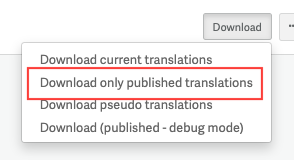
API download parameter
This retrieves published and prepublished translations only, falling back to the source string for anything else. The "current" or "pending" option downloads all saved translations regardless of prepublish status, and is better suited for testing than production.
Prepublishing with connectors
What triggers a connector download, and whether prepublished translations are included, depends on the trigger type. The table below summarizes each scenario.
| Trigger | Connector Behavior | Prepublish Results |
| Manual (user-initiated) export of translated item. | Connector downloads according to the retrieval type setting. | Prepublished translations are downloaded. |
| Standard callback | When it receives a callback, the connector downloads according to the retrieval type setting. | Since the standard callback is not sent until all translations reach the Published step, prepublished translations are not downloaded until moved to the Published step. |
| Polling |
The connector periodically checks string workflow state and only downloads when all authorized strings are in the Published step. For Sitecore, we download the results of the 'recently published' API endpoint, but this endpoint does not include files that were only prepublished; they need to be fully moved to the Published step to be identified here. |
Prepublished strings are not downloaded until moved to the Published step. |
| Prepublished callback (see below) | When it receives a callback, the connector downloads according to the retrieval type setting. | Prepublished translations are downloaded. |
| Job callback (GitHub connector) |
The GitHub connector is unusual in that it waits for a job-completion callback rather than the file-based callback to trigger file downloads. However, prepublishing can be achieved by enabling prepublish on the workflow and in any enabled SmartMatch rules, as well as Early Delivery on a configuration set. |
Prepublished translations are delivered in an Early Delivery pull request. |
For one-off needs, manual export is the simplest way to deliver prepublished translations. For ongoing automated delivery, the prepublished callback is the right approach, but see the setup instructions above, as all three parts must be configured correctly for it to work.
Callback on prepublish (for a connector or API project)
The standard callback is sent when all authorized strings in a file reach the Published step for a given language. If the prepublished callback is configured for a connector or custom API integration project, the callback triggers the connector or API integration to download translations.
A project can also be configured to send callback notifications when all authorized strings either reach the Published step or are prepublished in a language. This "file prepublished" callback triggers delivery sooner than the standard callback. When the prepublished callback is enabled, the standard callback is still sent once all strings reach the Published step.
Important: The prepublished callback is not enabled by default. A Smartling representative must enable it for your project via the Project Admin page. See the setup instructions at the top of this article for the full list of requirements.
Test this option carefully to ensure your integration correctly handles the prepublished callback and also picks up the subsequent standard callback when strings reach the final Published step. Some connector platforms and API integrations may not handle both callbacks as expected. Consult your Solution Architect before enabling this in production.
Prepublishing with SmartMatch and leverage
Prepublished translations are treated as Published from a translation memory (TM) perspective, which means they can be picked up by SmartMatch. Whether this is desirable depends on your workflow. For example, if a TM contains prepublished translations, enabling "SmartMatch to Published" from that TM could match new strings against translations that have not been fully reviewed.
Critically, if you are using connector callbacks alongside SmartMatch, the "Enable Pre-Publish" checkbox must also be enabled on each SmartMatch rule (under Leverage Configuration > SmartMatch Settings). If a SmartMatched string skips prepublish, the "file prepublished" callback is blocked for the entire file. See the setup instructions above and Smartling's SmartMatch for details.
Note: The above information applies to content using a human translation workflow. For more on how prepublished translations are saved to the translation memory for MT and AI workflows, see our overview on Machine Translation in the Translation Memory.
How to prepublish translations
There are three ways to trigger prepublishing:
- Actions menu in Strings View: Select the translations you want to prepublish and go to Actions > Prepublish. This option is useful for ad-hoc prepublishing when needed.
-
Workflow Step Configuration: Go to Manage Step > Automation > Prepublish and select either:
- On Save: Prepublishes translations any time changes are saved.
-
On Submit: Prepublishes translations when the translation is submitted to the next step. (Note that "moving" the translation to the next step will not prepublish it; it has to be "submitted.")
Note whether the workflow is an account workflow or a project workflow. If prepublishing is enabled on a step of an account workflow, all projects using that workflow will also have their strings prepublished.
-
SmartMatch Configuration: When enabling SmartMatch to any step other than Published, you have the option to also prepublish the translation. This results in the translation being populated by SmartMatch, moved to the appropriate workflow step, and prepublished.
Note: Moving a string to the Published step and then back to an earlier step has a similar effect to prepublishing (the translation is treated as published), though it is not labeled as prepublished in the UI.
Viewing prepublished translations
Filters
You can filter for strings that are prepublished, or available to be prepublished, in the Strings View filter panel:
Dot indicator
Prepublished strings are marked with a small dot indicator in the Strings View:
If an earlier translation was prepublished and was later changed but not prepublished again, the dot indicator won't appear, even though the string still has a prepublished translation on record. The prepublish event is still visible in the string's history.
String history
Prepublishing is logged in the string's history, visible under the History tab in String Details:
Job progress
Prepublishing does not affect job progress indicators. Progress is calculated based on the actual workflow step the translation is in, not its prepublish status.
Considerations
- Only use prepublishing where translations can be updated after the fact. Email is a common example where it is not appropriate: once an email is sent, the translation cannot be changed.
- For the first prepublish-enabled step in a workflow, prepublish-on-submit is preferred because:
- It captures the final saved version from that step, not intermediate saves.
- It catches all content that passes through the step. Prepublish-on-save only prepublishes strings that were actively edited in that step.
- It avoids prepublishing work-in-progress that is saved mid-edit.
- If prepublish-on-submit is enabled for a step, consider enabling prepublish-on-save for any subsequent steps so that edits made later in the workflow are also picked up.
- Translators working in steps with prepublish-on-save enabled should be aware that every save, even mid-draft, will prepublish the current state of the translation.
- If translations often stall in a Review step, the better approach is to enable prepublish-on-submit on the prior step, or to manually prepublish as needed.
- If prepublish is enabled for a Translation step using an MT Profile, the unedited machine translation will be prepublished to the final environment, but it will not be saved to the translation memory. Prepublished human translations will be prepublished to the final environment and also saved to the TM.
- Prepublished translations that are saved to the TM (i.e., prepublished human translations) can be used for SmartMatching.
- Avoid using TMs that may contain prepublished translations in "SmartMatch to Published" mode, since this could match new strings against translations that have not been fully reviewed.
- If you use the GDN static cache, note that pages containing prepublished translations may need to be manually refreshed to reflect subsequent translation updates.
Some additional details
Smartling maintains two translations for each string:
- Current translation (also called "pending" when using the API). As long as a string is active and in progress in the workflow, the current translation is the most recently saved version of a translation. If a string becomes inactive, e.g., due to its source file being deleted, the current translation is removed.
- Published translation. This is the most recent translation that was either prepublished or moved to the Published workflow step. If neither of those things has happened, the published translation is a copy of the source string. Published translations are what the GDN displays and what the "Published" option delivers when downloading via Dashboard, API, or Connector, and they include prepublished translations.
The published translation value exists from the moment a string is created, before any translation reaches the Published step.
The published translation is not updated when:
- A prepublished translation is subsequently edited without being prepublished again.
- A translation in the Published step is moved back to an earlier step and modified there. (Changes made directly in the Published step do update the published translation.)
In these cases, the published translation may not be visible in the list view, but it is still the value served by the GDN and returned by published-translation downloads.
If a string becomes inactive (for example, because the source file was deleted) while still in progress, the published translation is removed, though it remains in the TM. If the string becomes inactive while at the Published step, the published translation is retained and reappears automatically if the string becomes active again.