Introduction
The Repository Connector is a Java application that bridges your Git repository (GitHub, GitLab, etc.) and Smartling's TMS. It automates the translation workflow by monitoring your repository for changes, uploading new content to Smartling, and delivering completed translations back to your repository.
This article explains how the Repository Connector works, helping you understand its behavior, optimize performance, and troubleshoot issues.
How it works
The Repository Connector operates as a standalone Java application that runs continuously in your infrastructure. It communicates with both your Git server and Smartling's cloud services.
Key components
- Git Server - Your source code repository (e.g., GitLab, Bitbucket)
- Repository Connector - The application running in your infrastructure
- Smartling API - Smartling's cloud translation service
Communication flow
- Git → Connector: Webhooks (push events) or polling schedule
- Connector → Git: Clone/pull repositories, commit/push translations
- Connector → Smartling: Upload source files, download translations
- Smartling → Connector: Callbacks when translations complete (optional)
Internal state management
The connector maintains two key components:
- Queue: Ensures events are processed asynchronously and reliably. Events persist to disk, so they survive restarts.
- Local Database: Tracks file state (which files were uploaded, last modification time, translation status per locale). This prevents re-uploading unchanged files and enables incremental updates.
How translation works
Uploading source content
The diagram below highlights the key points of this flow and may omit some low-level details.
Here is an outline of what happens when you commit changes to your repository:
- Detection: Git webhook notifies the connector (or connector polls on schedule)
- Queuing: Event is queued for processing
-
Analysis:
- Connector pulls the repository
- Reads
smartling-config.jsonconfiguration - Identifies changed files since last check
- Matches files against
pathRegexpatterns
-
Upload: For each matching file:
- Uploads file to Smartling with file type and directives
- If
authorizeContent = true: adds the content to the DailyUploads job and auto-authorizes it for translation - If
authorizeContent = false: adds the content to the awaiting authorization queue
- Tracking: Stores file metadata in local database
File URI format: {alias}/{branch}/{file_path}
Example: myapp/main/src/messages_en.json
Downloading translations
The diagram below highlights the key points of this flow and may omit some low-level details.
The connector periodically checks for completed translations:
- Check: Queries Smartling API for recently published files
- Compare: Checks local database to identify changes
-
Download Decision: Based on
downloadTranslations.trigger:-
COMPLETED: Downloads when all authorized strings are published (default) -
ONCHANGE: Downloads on any translation update
-
-
Delivery: For each file that is ready:
- Downloads translated file from Smartling
- Switches to target branch
- Pulls the latest changes
- Writes file to path defined by
translationPathExpression - Commits and pushes to remote
-
Conflict Handling: If push fails:
- Pulls with rebase and retries
- If it still fails, resets and retries on next check
Deployment options
The Repository Connector can be deployed in different network configurations depending on your security requirements.
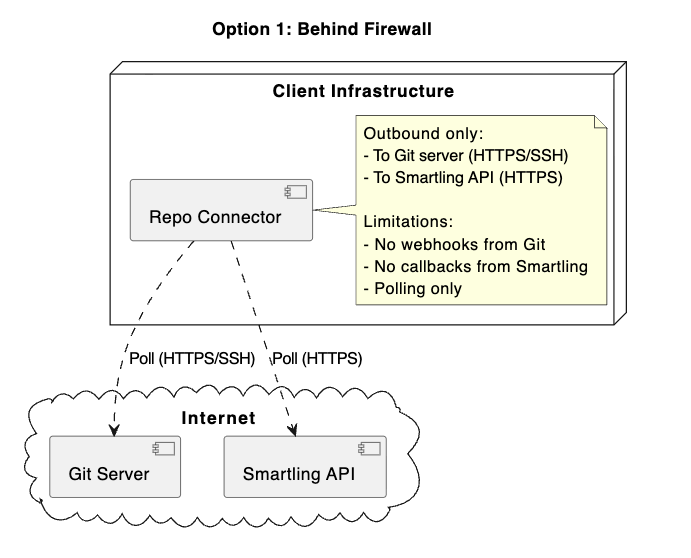
Option 1: Behind firewall (outbound only)
Configuration:
- Connector makes outbound connections only
- No inbound connections allowed
Firewall rules required:
- Outbound TCP 443 to Git server
- Outbound TCP 443 to
api.smartling.com
Limitations:
- Cannot receive webhooks from Git
- Cannot receive callbacks from Smartling
- Must rely on polling schedules
This deployment option is best for high-security environments where real-time updates are not critical.
Option 2: Publicly addressable
Configuration:
- Connector accepts inbound connections
- Publicly accessible URL
Benefits:
- Real-time uploads via Git webhooks
- Real-time downloads via Smartling callbacks
- Lower latency
Firewall rules required:
- Inbound TCP 443 from Git server webhook IPs
- Inbound TCP 443 from Smartling (whitelisted IPs)
- Outbound TCP 443 to Git server
- Outbound TCP 443 to
api.smartling.com
This deployment option is best for production environments requiring low latency.
Option 3: Behind proxy
Configuration:
- Connector routes all traffic through proxy
Required settings:
java -Dhttp.proxyHost=localhost \
     -Dhttp.proxyPort=3128 \
     -Dhttp.proxyUsername=user \
     -Dhttp.proxyPassword=pass \
     -jar repo-connector-{version}.jar -start
This deployment option is best for corporate environments that require a proxy.
Connector configuration overview
There are two main configuration files for the connector.
repo-connector.conf file
Located in the cfg/ directory, this file configures the connector application:
- repositories: Array of Git repositories to monitor (URL, credentials, Smartling project)
- http: HTTP listener settings (host, port, protocol, callbackUrl)
-
scheduler: Cron schedules for polling tasks
-
checkTranslation: How often to check Smartling for completed translations -
pollingSchedule: How often to check Git for new commits (if not using webhooks)
-
smartling-config.json file
Located in your Git repository, this file defines translation settings:
- locales: Locale mappings (Smartling ↔ Repository)
-
resourceSets: File patterns and translation rules
-
pathRegex: Java regex to match source files -
translationPathExpression: Groovy expression for translated file paths -
authorizeContent: Auto-authorize uploads (true/false) -
smartlingDirectives: File type directives
-