When the result set is large for certain list-style API endpoints such as List recently uploaded files, only a subset of it is returned in the response. The subset is defined by two parameters that can optionally be included in the request:
limitThe maximum number of items to return in the response.offsetThe index of the first item to be returned.
The effect of these parameters is illustrated below:
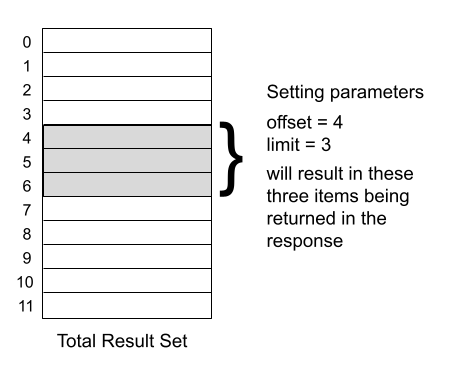
In other words, the items returned have indexes where:
offset ≤ index < offset+limit
If you don't include the offset and limit parameters in the request, the offset defaults to 0 and the response will include only the first page of results.
Paging through a result set
Endpoints that take limit and offset parameters return a totalCount value in the result, which can be useful in paging logic. However, this value is set in two different ways, depending on API endpoint called, so care is needed to implement paging correctly:
- strings-api endpoints.
totalCountis set to the number of items included in the current response - All other endpoints.
totalCountis set to the total result set size including all pages.
Paging through strings-api endpoints
In this case, totalCount is set to the number of items returned in the current response. Since we don't know the size of the total result set, the approach is to simply continue asking for the next page until we reach the end. This is illustrated in the Python code sample below:
api_url = 'https://api.smartling.com/strings-api/v2/projects/' + project_id + '/source-strings'
api_headers = {'Authorization': 'Bearer ' + access_token}
offset = 0
limit = 10 # for example

while True:
    api_params = {
        'fileUri': 'strings.txt',
        'offset': offset,
        'limit': limit
    }
    resp = requests.get(api_url,
                        headers = api_headers,
                        params = api_params)

    if resp.status_code == 200:
        count = resp.json()['response']['data']['totalCount']
        items = resp.json()['response']['data']['items']
    else:
        # check/handle errors, then
        break

    # if fewer items in current response than asked for, we're at the end
    if count < limit:
        break
    # otherwise prepare to request the next page
    else:
        offset += limit
Paging through non-strings-api endpoints
For non-strings-api endpoints we can use totalCount in our paging logic, as illustrated below:
api_url = 'https://api.smartling.com/strings-api/v2/projects/' + project_id + '/source-strings'
api_headers = {'Authorization': 'Bearer ' + access_token}
offset = 0
limit = 10 # for example

while True:
    api_params = {
        'fileUri': 'strings.txt',
        'offset': offset,
        'limit': limit
    }
    resp = requests.get(api_url,
                                headers = api_headers,
                                params = api_params)

    if resp.status_code == 200:
        totalCount = resp.json()['response']['data']['totalCount']
        items = resp.json()['response']['data']['items']
    else:
        # check/handle errors, then
        break

    # if setting the offset to the start of the next page
    # puts it beyond the total count, we're finished
    offset += limit
    if offset >= totalCount:
        break
Generic paging to the end
If we want code that will work for both cases, we can take an approach similar to the strings-api one, except instead of using totalCount, we can just count the results ourselves and use that value:
api_url = 'https://api.smartling.com/strings-api/v2/projects/' + project_id + '/source-strings'
api_headers = {'Authorization': 'Bearer ' + access_token}
offset = 0
limit = 10 # for example

while True:
    api_params = {
        'fileUri': 'strings.txt',
        'offset': offset,
        'limit': limit
    }
    resp = requests.get(api_url,
                        headers = api_headers,
                        params = api_params)

    if resp.status_code == 200:
        items = api_response.json()['response']['data']['items']
        count = len(items)
    else:
        # check/handle errors, then
        break

    # if fewer items in current response than asked for, we're at the end
    if count < limit:
        break
    # otherwise prepare to request the next page
    else:
        offset += limit
List changes and sorting
Your code should account for the fact the total result set could change while you're paging through it. For example, a dashboard user or a separate process could add or delete files, resulting in a different actual total count than is reported in the response. In addition, some endpoints support requesting the list in a sorted order; and the effects of list changes that occur while paging through the results can differ depending on the sort order.