
Info: Get the latest version of the connector from the Downloads page.
Version 5.8.86
Release date: October 26, 2026
Improvement
Smartling job names now match the AEM translation project title
When you request a translation outside the Smartling dialog (for example, from the References panel), the connector now names the Smartling job after the AEM translation project. A project titled "Spring Campaign" creates a job named "Spring Campaign - 1234567890123". The connector appends a number to keep job names unique.
Version 5.8.85
Release date: October 16, 2026
Improvement
A new optional feature lets you control access to the connector’s
Translatebutton through a dedicated permission. The connector introduces the permissionsmartling:translationButton, which only manages the visibility of the button. Users can still request translation through theReference Panel. By default, the permission is set toallowon the path/contentfor theSmartling Project Ownergroup.

How to use the feature
First, your AEM administrator must enable the feature in OSGi. It is off by default.
After that, an administrator can assign the permission to a specific user or group. For example:
In this example the Translate button will not be available forExperienceandProducts.
This feature works for Sites, DAM, Forms, and Page Editor UIs.
Version 5.8.84
Release date: September 22, 2026
Improvement
The connector has a new OSGi configuration option,
Pseudo delivery Smartling locales. Here you can specify a list of Smartling locales forpseudotranslation.
This option turns on thePseudo translationoption in the Smartling dialog if the set of target languages matches the list of languages in the OSGi configuration.
It only works if you haven't manually changed thePseudo translationoption.
Version 5.8.83
Release date: September 14, 2016
Bug fix
Fixed an issue where the connector used a hyphen instead of an underscore in the Smartling namespace on AEM 6.5 LTS SP2 and newer, which could cause existing content to be treated as new and retranslated unnecessarily.
Version 5.8.82
Release date: August 11, 2026
Improvement
The connector shows a dialog with a message on every failed validation, meaning that when content is submitted for translation and there is nothing new to translate, it will block the translation request.
Also, the Smartling dialog prevents submitting content that is already up to date with the latest translations.
Version 5.8.81
Release date: July 6, 2026
Bug fix
The connector resolves translation rules and property mappings the same way AEM does. It prioritizes specific-component property mappings over general/child-node mappings. See the notes below.
Property mapping: what to review after this upgrade
This release improves how the Smartling AEM connector decides which parser (Auto, Html, Text, or Markdown) to apply to each property you send for translation.
What changed
The connector now applies the parser you configured for a component more consistently, including for properties inside multi-value or nested components (carousels, lists, tabs, and similar) and follows the same inheritance behavior as AEM's translation rules. In some setups this means a property that was previously treated as plain Text may now be treated as HTML (or the other way around), so that it matches what you configured.
Do I need to do anything?
Only if you use a property-mapping configuration file (property_mappings.json). If you don't, nothing changes for you.
What to review
If you use property mapping, review these cases — they are the ones most likely to be affected:
Properties inside multi-value or nested components (carousels, lists, tabs, accordions, etc.). Confirm the parser configured for those component properties is the one you want.
A property configured in two places — both "generally" and on a specific component. The specific component's setting now takes precedence.
Nested content-path scopes with inheritance. A setting inherited from a higher-level scope now applies even when a more specific scope opted out of inheritance.
Recommendation
There are four parser options: Auto, Html, Text, and Markdown. Auto is the default — it guesses the parser from the content, which can vary. For any property where the parser matters, set it explicitly instead of leaving it on Auto; an explicit value is predictable and stable. Set the parser in either place:
In the Translation Rules configuration UI (component / property editor): choose the value from the Parser dropdown — Auto, Html, Text, or Markdown. The UI saves the selected value.
In the
property_mappings.jsonfile (if you edit it directly): use the exact lowercase value —"auto","html","text", or"markdown".
{ "propertyName": "description", "smartlingParser": "html", "inherit": true }What to expect
For any property whose parser changes as a result of this upgrade, the next translation job may re-send that content. Because the content is now parsed differently, it may create new strings that can't fully leverage your existing translation memory. As a result, some strings may not SmartMatch and may need to be translated again. Translate these in your normal translation workflow.
Version 5.8.80
[6/10/26]
Improvement
NEW: Automatic Request Translation on Republish Setting
Once a file is fully published, the AEM connector delivers translations to AEM, but any subsequent edits to those published translations are not automatically sent back. Previously, to push updated translations from Smartling back to AEM, you would need to use the Force Resubmission option to create a new AEM Translation Project. With this new setting enabled, the connector automatically resubmits content when published translations are edited and republished after the original AEM job completed, eliminating manual resubmission when translators fix content post-delivery.
How it works
The feature is managed in the OSGi configuration.
The connector runs a background job on a configurable schedule. At each interval, it checks whether any translation updates have been made to previously submitted content, using metadata saved at the time of the original upload. If updates are detected, the connector automatically resubmits the content to the same Smartling job using the original request parameters: job, target language, and custom fields.
If the original job no longer exists, the connector creates a new job.
Limitations
Applies to pages, Experience Fragments (XFs), and Content Fragments (CFs) only.
Automatic resubmission only applies to content that was originally requested after this setting was enabled.
Version 5.8.79
[5/15/26]
Improvement
Introduced a new option for the
Move stringssetting. TheMove stringsdropdown replaces the deprecated checkbox and controls which strings are added to the requested job on each file upload. Three options are available:None – only add new strings
In Progress – also add existing untranslated strings from other jobs
All – move every string in the file, including already published ones
Options:
Version 5.8.78
[5/7/26]
Improvement & Bug Fix
Add to Jobtab displays up to 100 jobs. This limit can be adjusted in the OSGi configuration.
User is now added to the
smartling-projects-ownersgroup as a project owner/observer when a workflow error occurs or the polling limit is exceeded during translation request processing.
Version 5.8.77
[4/24/26]
Improvement & Bug Fix
The connector now uses an updated approach to preprocessing source XML files. The property mapping algorithm recreates XML nodes rather than renaming them, avoiding XML namespace validation entirely.
Fixed an issue where the connector was incorrectly detecting the AEM version when multiple products are installed on the same AEM instance.
Version 5.8.76
[4/09/26]
Improvement
It is now possible to select multiple Experience Fragments and create a translation request for them.
Bug fixes
Smartling's
AUTOparser option now detects and parses markdown.When requesting context information for non-content entries (such as ASSETMETADATA, TAGMETADATA, or I18NDICTIOARY), no error is shown.
Version 5.8.75
[3/30/26]
Bug fix
Connector does not check AEM content for XML errors.
Version 5.8.74
[3/13/26]
Bug fix
Namespace resolution algorithm compares AEM and ISO 639 language codes regardless of whether a hyphen or underscore is used.
Version 5.8.73
[2/19/26]
Improvements
Upgraded
Apache Commons Collectionsto version 4.4.
Version 5.8.72
[2/10/26]
Improvements
The connector now supports an instant translation option, allowing you to generate translations without creating a translation job or routing content through a translation workflow. Instead, content is translated immediately using Smartling’s Instant MT service. This option can be selected as a translation method.
The Instant Translation dialog was introduced to support this feature. It appears if the translation provider is set tosmartling-instantin the Cloud configuration for the selected content.
Version 5.8.71
[12/30/25]
Internal improvement released
Version 5.8.70
[12/29/25]
Bug fix
The connector now supports the directive
<characterLimit>none</characterLimit>for XML properties that should not inherit the character limit from a previous string in the file.Fixed an issue related to saving property mappings.
Version 5.8.69
[12/15/25]
Improvement
A new Smartling workflow parameter,
localeWorkflows, has been added. It stores associations between a SmartlingtargetLocaleand aworkflowUid, for example:[ { "targetLocale": "fr", "workflowUid": "42478ed22598" }, { "targetLocale": "de", "workflowUid": "04ec4daa5daf" } ]The specified workflow will be used for content sent for translation in the corresponding target language. For additional context, please see AEM Touch/Cloud Connectors Technical Resources.
Version 5.8.68
[11/18/25]
Bug fix
When requesting additional locales for Experience Fragments, files are no longer duplicated.
Version 5.8.67
[11/7/25]
Bug fix
Character limit feature now works with
Autoparser option.
Version 5.8.66
[10/31/25]
Improvement
You can now set a character limit for a property mapping. We recommend using this feature with plain text strings. The limit will be shown to the translator/linguist working on the translation in the CAT Tool.
Alternatively, you can specify the limit in the
property_mappings.jsonfile. For example:{ "contexts": [ { "path": "/content", "components": [ { "type": "General", "mappings": [ { "propertyName": "text", "smartlingParser": "text", "characterLimit": "255", "inherit": true } ] } ] } ] }
Version 5.8.65
[10/27/25]
Bug fix
Several fixes have been implemented for the context feature. The connector now respects the language set for a language root and takes the language into account for resolving source content for taking context. The native context renderer composes proper URL for the context. This URL is then displayed in the Smartling dashboard within the Context tab of your AEM project.
Version 5.8.64
[10/23/25]
Bug fix
Previously, ambiguous language mapping could cause the connector to generate an incorrect namespace for uploaded files. This issue has been resolved. The connector does not use language mappings for file namespaces.
Version 5.8.63
[10/20/25]
Improvements
Introduced context feature for Adaptive Forms.
Context for a page and an experience fragment can be taken from source page/fragment.
Version 5.8.62
[10/3/25]
Improvement
Multiple pages can be sent for translation. Users should open the Sites view, select several pages, and click the Translate button in the action bar. The Smartling Dialog will appear. There is only one difference from the usual Smartling Dialog shown in the page editor: users cannot manage subpages if several pages were selected.
Version 5.8.61
[9/29/25]
Internal improvement released
Version 5.8.60
[9/23/25]
Improvement
Implemented support for Adaptive Forms.
Bug Fix
Fixed the connector's validation for strings sent for translation. It now validates all strings for a text and/or for valid XML subnodes.
Version 5.8.59
[9/12/25]
Improvement
The connector now supports the Markdown content type. You can map a property to Markdown either through the Translation Rules UI or in the
property_mappings.jsonfile.
Version 5.8.58
[8/26/25]
Improvement
The connector now supports AEM 6.5 LTS.
Version 5.8.57
[7/29/25]
Bug fix
The connector now matches properties to translation rules for nodes and all subnodes. Components in AEM may store their data in subnodes and descendant nodes in the repository. The AEM Translation framework matches translation rules not with the component itself, but with all subnodes. The connector can now match the Smartling parser in the same manner.
Version 5.8.56
[6/26/25]
Improvements
In the event of a rendering error, the context image will be taken from the repository.
The connector makes HTTP connections to Smartling with socket timeout set to 40000 milliseconds by default. If you experience errors related to
SocketTimeoutException, you can adjust this value in the OSGi settings.
Version 5.8.55
[6/10/25]
Internal improvement released
Version 5.8.54
[5/29/25]
Bug Fixes
The connector waits until AEM has fully prepared a translation project. Once AEM completes this process, the connector overwrites the
Auto *project options.The connector can now work with the AEM Translation Framework's upload call, even when the source language parameter is not provided.
Version 5.8.53
[5/23/25]
Improvement
Autooption for Smartling parser was introduced in the Translation Rules UI.
Bug Fix
Fixed missing MIME type for an asset retrieved directly from AEM for context.
Version 5.8.52
[4/29/25]
Improvement
Added check for existing locale mapping for the source locale in the Smartling Dialog.
Version 5.8.51
[4/24/25]
Improvement
The connector captures context directly from AEM in a native way using
SlingRequestProcessor. This is the default behavior. To switch back to HTTP based rendering, use the optionUse direct renderingin theSmartling - Context Preview Settings (Touch)OSGi config.
Version 5.8.49
[2/27/25]
Improvement
Smartling Dialog validates translation method and provider applied to the content.
Version 5.8.48
[2/19/25]
Improvement
If the user does not specify a parser, the connector will detect a Smartling parser (Text or HTML) for the property content. If the property string does not contain an HTML tag, &, or ", the connector assumes it is just text and not HTML.
Version 5.8.47
[2/10/25]
Improvement
The connector takes context from the target page/XF/DAM, not from the source. It ensures that the context matches the styles and JavaScript set for the target content.
Version 5.8.46
[1/30/25]
Improvement
Smartling credentials can be set in OSGi configuration. Credentials cannot be changed in UI in this case.
Bug Fix
Fixed updating
payloadof workflow form on page editor.
Version 5.8.45
[1/24/25]
Improvement
Connector allows you to request a DAM folder and all its descendants. By default, it includes the folder’s children.
Version 5.8.44
[1/21/25]
Improvement
Pseudo translation default option was added to OSGi configuration Smartling - Dialog configuration (Touch)
Bug Fix
AEM Translation Configuration UI correctly displays the Smartling parser for context with inherited rules.
Version 5.8.43
[1/13/25]
Bug Fix
Connector applies Smartling parser (HTML/Text) according to inheritance of translation rules context.
Version 5.8.42
[12/27/24]
Bug Fix
The validator for AEM-created XML files was updated to allow XML string as a property value.
Version 5.8.41
[12/25/24]
Internal improvement
Version 5.8.40
[12/20/24]
Improvement
Minor refactoring to fix AEM warnings. Changed the main package's type to
container.
Version 5.8.39
[12/2/24]
Bug Fix
Connector checks translation rules for AEM components taking into account inheritance between them.
Version 5.8.38
[11/22/24]
Bug Fix
Connector trims whitespaces in Smartling job name and page/experience fragment title before initiating the translation flow. This ensures that registered AEM repository namespaces are not used as job or page names.
Version 5.8.37
[11/1/24]
Improvement
Context is taken from source content.
Connector uses the latest Smartling Java API.
Connector checks if the target content prepared (exists) for translation request.
Version 5.8.36
[10/11/24]
Improvement
AEM
translation job Idwas shortened to 12 alphanumeric symbols ([a-zA-Z0-9]). You will see a shorter file name in the Smartling dashboard.
Example:62f1a6b0-eb31-4cb5-9ac5-c2b7b70b3a4e:/content/launches/2021/08/26/men2/content/we-retail/language-masters/de/menwill bed4p56Lsew2m9:/content/launches/2021/08/26/men2/content/we-retail/language-masters/de/men
Version 5.8.35
[09/18/24]
Internal improvement released
Version 5.8.34
[09/13/24]
Internal improvement released
Version 5.8.33
[08/21/24]
Improvement
Pseudo option is added to
Create Jobin Smartling Dialog. IfPseudo translationcheckbox is checked, connector will retrieve pseudo translation for the content.
Bug Fix
Fixed reset of UI form after closing the dialog.
Version 5.8.32
[07/31/24]
Bug Fix
DOM mutation events are replaced with JS Observer.
Version 5.8.31
[07/19/24]
Bug Fix
Fixed language options set in the Smartling dialog for cases where the dialog is reopened on one Experience Fragment and then on another Experience Fragment later.
Version 5.8.30
[07/02/24]
Target content validator is added. Can be turned on in OSGi configuration.
Version 5.8.29
[04/22/24]
Internal improvement released
Version 5.8.28
[04/15/24]
Improvement
The Connector now trims any extra spaces that a user may accidentally add to their Smartling credentials while configuring the Connector.
Version 5.8.27
[03/29/24]
Internal improvement released
Version 5.8.26
[03/25/24]
Improvement
A new OSGi option
Custom Directives listwas introduced. All the directives added to this configuration will be applied when translatable content is uploaded to Smartling.
Version 5.8.25
[03/20/24]
Internal improvement released
Version 5.8.24
[03/18/24]
Improvement
A new OSGi
Enable Legacy Config Validationoption has been introduced. It allows you to disable or enable the validation of a legacy configuration applied for a page.
Version 5.8.23
[03/11/24]
Improvement released
The
Callback Host URLoption has been replaced with aCallback URLoption. Customers should specify the full callback URL, e.g. http://my-aem.host.com/services/smartling/sync-translation.
For backward compatibility, the previously specified optionCallback Host URLis not shown, but exists internally and it is used if noCallback URLoption has been specified.
Version 5.8.22
[02/29/24]
Internal improvement released
Version 5.8.21
[02/15/24]
Improvement
Context is enabled for Author AEM instance only.
Version 5.8.20
[02/08/24]
Internal Improvement
Version 5.8.19
[12/08/23]
Improvement
Updated
Auto Authorizeoption in OSGi configuration. When enabled in OSGi configuration, it is enabled by default in the Smartling Translate dialog.
Version 5.8.18
[11/23/23]
Bug fix
Fixed validators for proper processing of several assets or content fragments.
The release package is available to be downloaded here.
Version 5.8.17
[11/14/23]
The release package is available to be downloaded here.
Version 5.8.16
[11/02/23]
You can now configure AEM Translation project with automatic options.
Version 5.8.15
[09/26/23]
Bug Fix
Fixed bug with DITAMAP files.
Version 5.8.14
[8/16/23]
Bug Fix
Fixed bug with polling AEM when a translation project is created.
Version 5.8.13
[7/19/23]
Improvement
Siblings languages onlyoption specified forSmartling - Page language copy manager (Touch)configuration works for assets too.
Bug Fix
Fixed error for loading projects on non-content or service pages.
Version 5.8.12
[6/14/23]
Internal Improvement Released
Version 5.8.11
[6/9/23]
Improvement
Improved security of the Callback.
Version 5.8.10
[5/24/23]
Improvement
Added support of web callbacks.
Version 5.8.9
[4/18/23]
Improvement
Added a toggle
Only sibling language rootsfor narrowing a list of languages on Smartling dialog.


Version 5.8.8
[4/5/23]
Bug Fix
Smartling job locale validator checks locales available for the current page/XF/CF only.
Version 5.8.7
[3/17/23]
Improvement
You can now search by locale code in the Target Language field of the Translate dialog, as shown:

Connector installs a new security group
Smartling Projects Owners. Every user assigned to the group gets Owner and Observer roles for every translation project created via Smartling Dialog.

Warn: The user assigned to the group should have appropriate permissions for managing a translation Job. AEM may encounter issues with applying translations under the user permissions. It is recommended the user should be assigned to the Authors and Projects Administrators security groups along with the Smartling Projects Owners group at least.
Version 5.8.6
[3/10/23]
Improvement
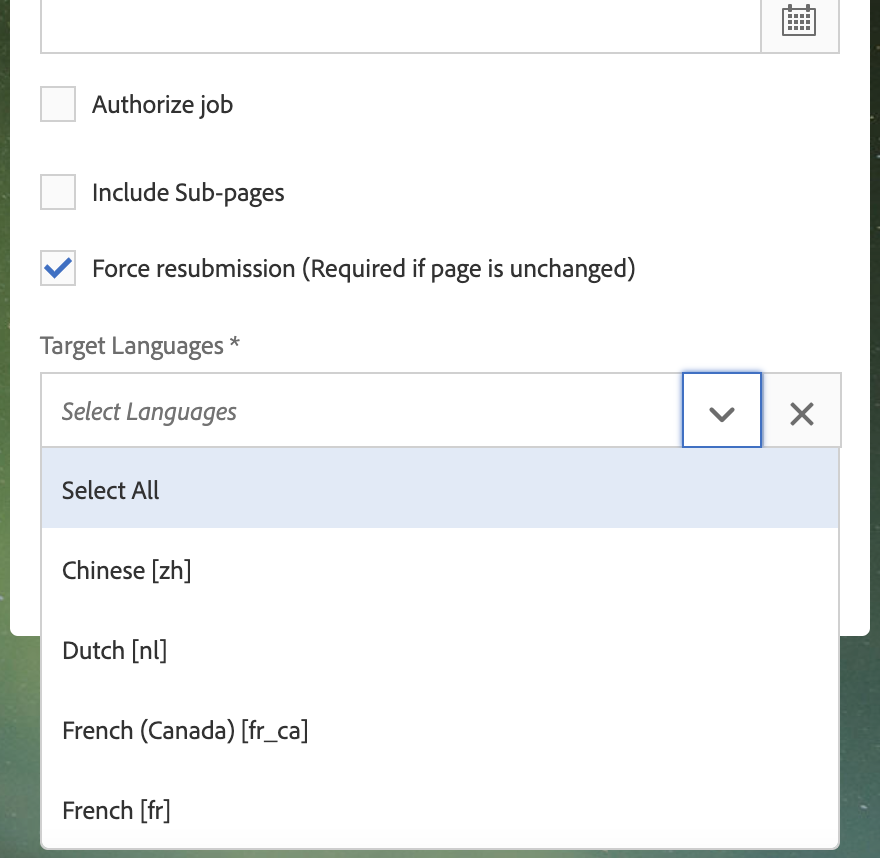
The target language selector on the translation dialog now shows country and locale for each language option.

Version 5.8.5
[2/27/23]
Bug Fix
Fixed issues with a workflow for multiple translation projects created by AEM 6.4 SP4 for selected subpages.
Variants for i18n dictionary are now set from i18n-keys/property names.
Version 5.8.4
[2/9/23]
Bug Fix
Fixed permissions for overlay of the list of custom languages.
Fixed processing of blank text sent for translation.
Improvement
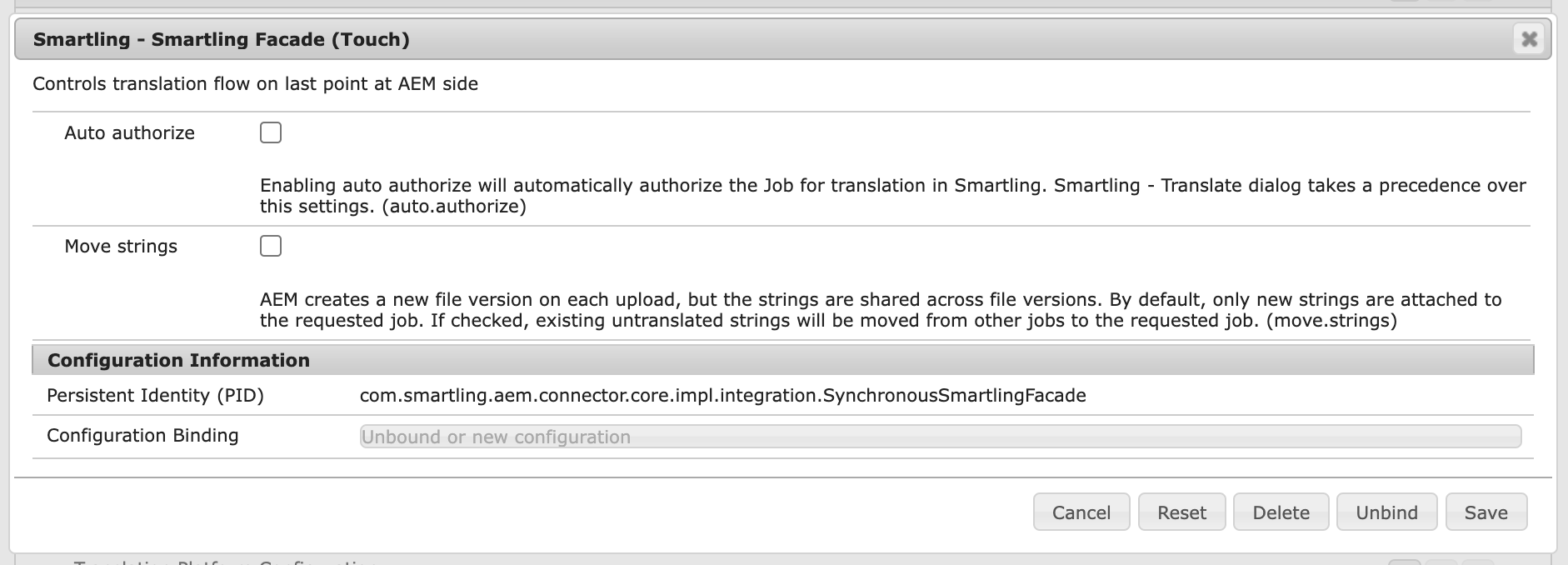
Added
Move stringsoption to handle updates to translations

Version 5.8.3
[12/23/22]
Bug Fix
Translation project folder name is created properly from long page title.
Improvement
Language selector shows languages in alphabetic order.
Version 5.8.2
[12/21/22]
Bug Fix
Fixed scroll of language selector showed many languages.
Version 5.8.1
[12/19/22]
Improvement
You can now include Job Custom Fields if enabled in Smartling and the connector's configuration

Bug Fix
Fixed showing a validation failed message on the Smartling Dialog.
Version 5.8.0
[11/15/22]
Improvement
Metadata in images and documents (DAM assets) can be sent for translation.

You can now choose which Smartling project to send content for translation to.


Version 5.7.2
Bug fix
Connector checks for new content in subpages. Excluded subpages are no longer checked for updates.
Version 5.7.1
Bug fix
Fixed error on taking Smartling custom fields for a page without any language assigned.
Version 5.7.0
Improvement
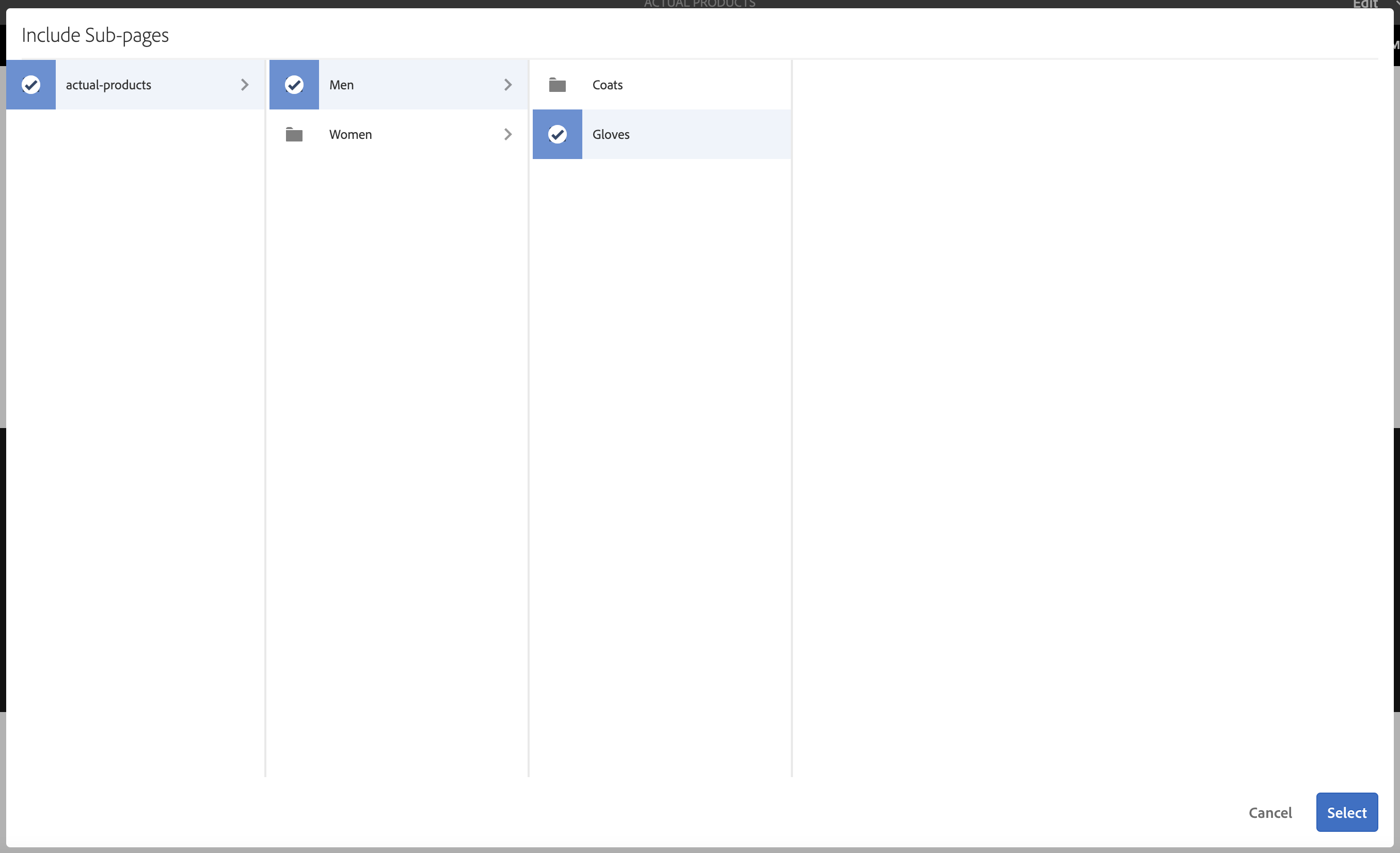
A set of subpages can be configured for pages and Experience Fragment. Checked
Include Sub-pagesoption shows additional buttonConfigureon Smartling dialog

Clicking on the button opens a dialog for selecting a particular subpages


Version 5.6.23
Internal Enhancement Released
Version 5.6.22
Bug Fix
Removed wrong information message about missed locale mappings for duplicate languages, e.g. [fr, de, fr, de, fr]
Version 5.6.21
Internal Enhancement Released
Version 5.6.20
Bug Fix
Fixed
Force resubmissionoption for Content fragment translation request.
Version 5.6.19
Improvement
Smartling Job shows language display name provided by AEM instead of ISO 3166.
Version 5.6.18
Bug Fix
Fixed error in traversing over cycle of referenced content
Version 5.6.17
Improvement
Added new Smartling Dialog validator. The validator checks is there any updates on a content after the last translation.
Version 5.6.16
Bug Fix
Fixed bug with reconnect error in context connection. Test connection checks context for the whole multiconfiguration.
Version 5.6.15
Bug Fix
Fixed bug with unclosed HTTP client that loads context
Version 5.6.14
Internal Enhancement Released
Version 5.6.13
What's New
AEM Touch Connector now supports the translation of attached Microsoft Office Documents
Version 5.6.12
Bug Fix
Fixed multi-configuration authentication for context upload
Version 5.6.11
What's New
We added a new content upload configuration option in com.smartling.aem.connector.automation.impl.wcm.project.TranslationProjectResourceManager: polling.upload.complete="{Long}20"
It manages the waiting period of connector for upload in selected minutes: 10 mins is minimum, 20 mins is default, 30 mins is maximum. Your content will upload in this period after the translation request has started.
Bug Fix
Fixed caching context connection with wrong user typed credentials.
Version 5.6.10
Bug Fix
Adjusted error message for missed service user mapping. We made OSGi configuration in a standard format. OSGi configs are applied for all modes: author and publish. We made a log to be written into standard error.log. We made indices to be merged upon deployment.
Version 5.6.9
Bug Fix
Removed unnecessary check for overridden language properties for a source root page
Version 5.6.8
Improvement
Improved search for a Smartling configuration
Bug Fix
Fixed error message about missed language mapping
Version 5.6.7
Improvement
Introduced a hotfix for this AEM Cloud issue
Version 5.6.6
Bug Fix
Fixed processing bug when a custom field UID started with a digit
Version 5.6.5
Improvement
Property mapping configuration moved to /conf/global/settings/smartling/configuration/property_mappings.json.
Force resubmission option works for related assets on both AEM on-premise and AEM Cloud environments.
Bug Fix
Fixed checking translation rules for inherited context.
Removed Log4j dependency from connector package.
Version 5.6.4
Improvement
Force resubmission option works for related assets. (AEM on-premise only)
WCMMODE for context preview is configurable

Version 5.6.3
Bug Fix
Fixed Smartling client library issue for missed dialog on a specific editor page, e.g. AEM template editor
Version 5.6.2
Improvement
Smartling Job name can now be found by name in Translation Dialog (AEM on-premise only)


Version 5.6.1
Internal Improvement Released
Bug Fix
Fixed the infinite loop for cloud configuration validation
Version 5.6.0
Improvement
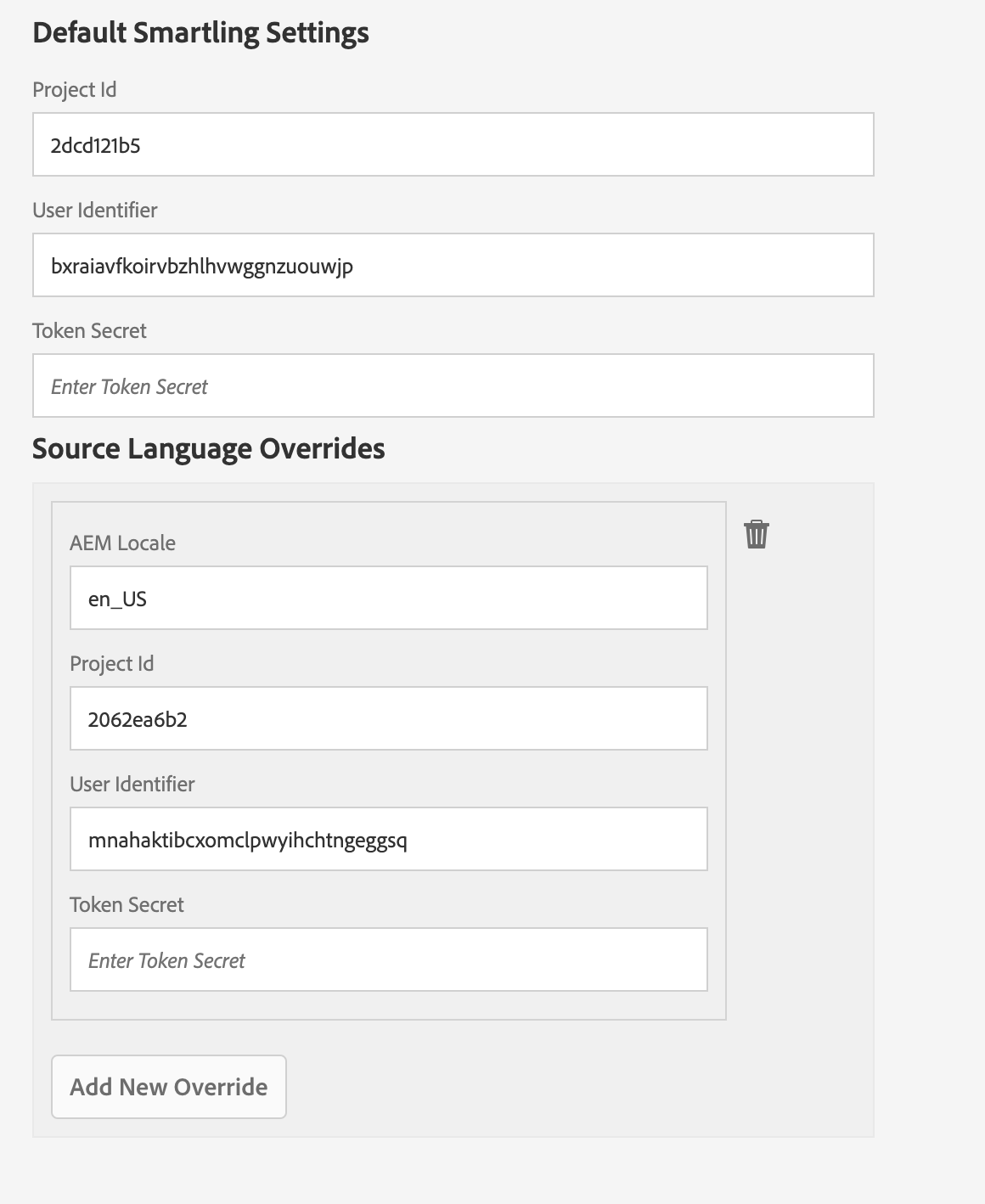
Connector supports additional configuration for a particular AEM source locale
Now content creators can continue to write content in their native language, and this can be submitted for translation, once that language is configured as a secondary source language.
The secondary configuration should include the secondary source languages as an AEM locale code

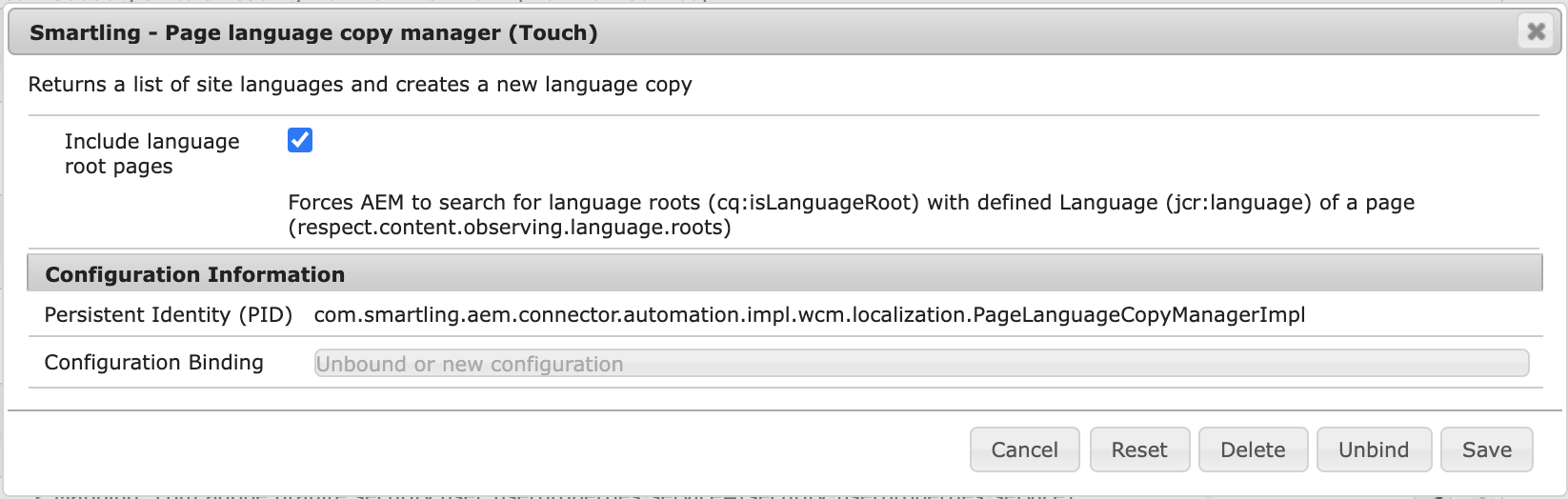
Added an option to show locales without respecting
Langauge Rootproperties.

Smartling Translation Dialog shows a short info about configuration is used for translation.


Bug Fix
Fixed issue related to mismatched locale case for a page and related Experience Fragment.
Version 5.5.2
Improvement
Locale of a page or experience fragment is built respecting site structure, e.g. /content/site/ch/fr/page is for
French (Switzerland)locale.Added index for
cq:cloudservicenameproperty of Smartling configurationConnector no longer uses user repository session for the most cases
Bug Fix
Fixed error when uploading tag metadata.
Fixed duplicate locales in language selector.
Version 5.5.1
Improvement
Added a new option for strings sent within AEM Experience and Content Fragments -
Use unique namespaces for Experience and Content fragments
This option allows you to send strings for a fragment with unique namespace, meaning strings will not be shared.
Pages with the same fragments strings can be translated independently and delivered separately.
This option overrides the use of legacy namespace option.
Version 5.5.0
Bug Fix
Fixed bug when using locale mappings for all Smartling API requests (upload content; checking translation status; deliver translations)
Version 5.4.13
Internal Improvement Released
Version 5.4.12
Improvement
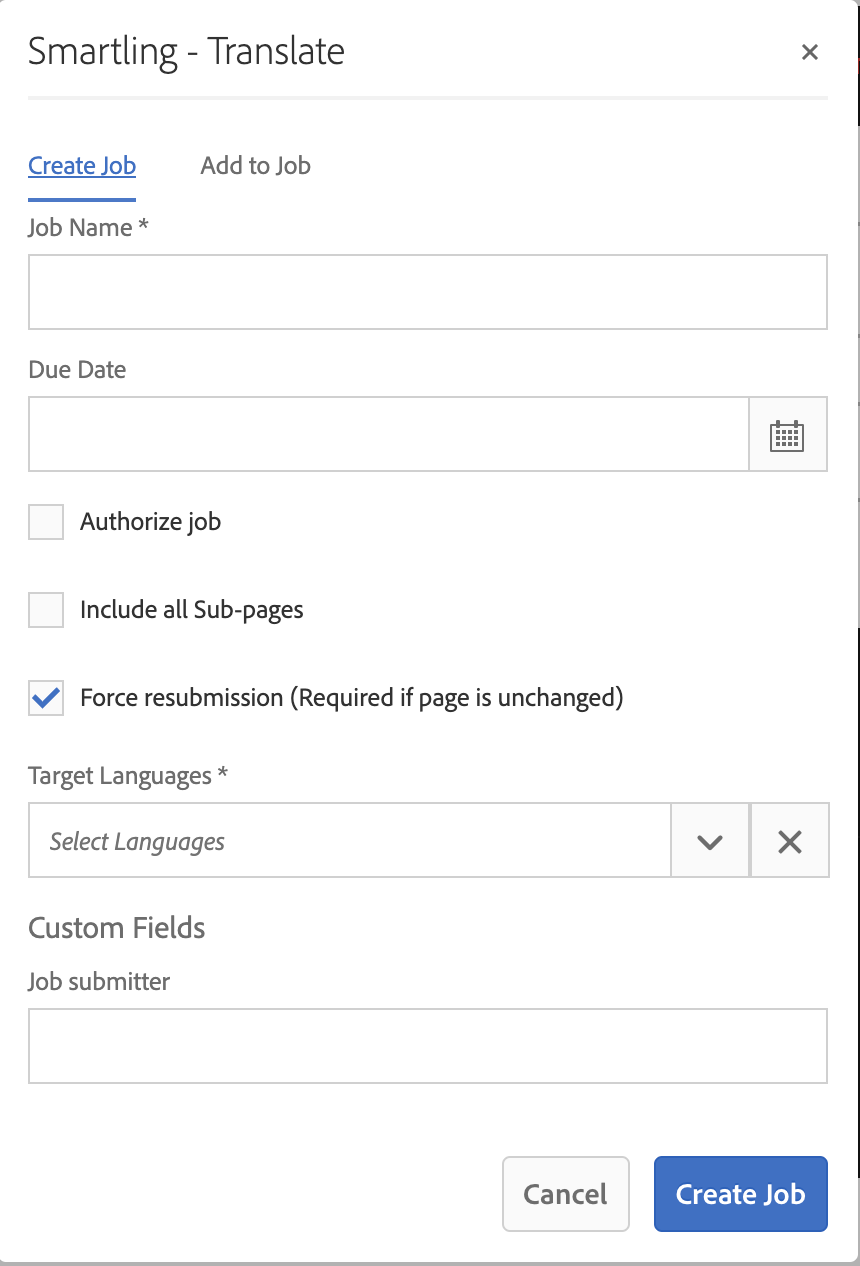
Connector shows Smartling custom fields in Smartling Translation Dialog. New OSGi configuration allows to add a list of custom fields names that should be shown on the dialog.


Version 5.4.11
New Feature
Connector is able to deliver Pseudo translation instantly. User should set up a locale where pseudo translation should be delivered in newly added OSGi configuration.
Version 5.4.10
Improvements
AEM Connector now polls AEM for created a translation project. New polling configuration is available in OSGi now.
Bug fix
Fixed warning about invalid Smartling service user mapping.
Version 5.4.9
Bug fix
Closed unreleased resource resolver in Smartling Workflow Process.
Version 5.4.8
Bug fix
Fixed translation search issue within a project. There are some rare cases when AEM asks for translation earlier than translation project is saved in repo. The connector waits until the translation is saved now.
Version 5.4.7
Bug fix
Fixed locale mapping validation message
Made indexes to be
lucenetype
Version 5.4.6
Improvements
Introduced language properties support for a page.
Bug fix
Fixed issue to stop Connector from starting "Sync Translation WF" for a Job on AEM 6.4.8+
Version 5.4.5
Improvements
Introduced support of DITA files. AEM XML-Documentation plugin uses these type of content for translating a topic.
The force resubmission option is now selected by default.
Bug fix
Fixed failing Smartling workflow on creating a language copy of a root live copy.
Fixed failing Smartling workflow on creating a language copy inside non-orderable folder.
Version 5.4.4
Bug Fix
Fixed issue with locale codes containing underscores in the Smartling Job details page.
Version 5.4.3
Improvement
Added configuration for context timeouts
The Token secret field on Smartling configuration page is now empty by default, meaning the user must input the token for each update before saving.
Bug Fix
There are cases when created language copy is a subpage of live copy. Fix causes connector to force detach from blueprint and to exclude subpage from the live copy.
Version 5.4.2
Bug Fix
Fixed validator for cloud configuration. The validator is successful if there was a configuration applied on a page directly and there was no target page created yet.
Version 5.4.1
Improvements
The AEM Touch Connector now detaches the language copy from the blueprint by default. You can revert to previous behavior (light end relationship) in new OSGi configuration
Smartling - Live Copy Manager Settings (Touch)

You can now force the AEM Touch Connector to authorize all translations by setting
Auto Authorizeoption in the new OSGi configurationSmartling - Smartling Facade (Touch)


Version 5.4.0
Bug Fixes
Added a new OAK index for searching AEM translation project.
SVG images are skipped on upload without any errors.
No errors are logged for missed property mappings file.
Fixed locale selector in Smartling dialog for single/multiple selected payloads.
Version 5.3.11
Bug Fix
Fixed bug with empty language selector list for several selected Content Fragments.
Version 5.3.10
Improvements
Added a validator that compares Smartling configuration applied for source and target pages.
Made Smartling workflow model step
Checking target localesto be auto-advanced.
Version 5.3.9
Bug Fix
Replaced using of suffix URL Sling segment for language selector suggestion with query parameter.
Version 5.3.8
Bug Fix
Fixed deploying of locale mappings for AEM Cloud. Added version for AEM Cloud package.
Version 5.3.7
Improvements
Added workaround for AEM fickle issue when
translation jobobject may not contain MIME type for a file. The connector will usetext/htmlMIME type for AEM translation job in this case
Version 5.3.6
Internal Improvement released
Version 5.3.5
Bug Fix
Fixed encoding for property mapping processing
Fixed user permissions for translation project
Version 5.3.4
Improvement
Fixed compatibility with AEM Cloud by replacing reflection on
TranslationObjectwith JCR query solution
Version 5.3.3
Bug Fix
Added a sanitization of Translation Project name. Now names will contain only: letters, numbers, dash, underscore, and spaces.
Version 5.3.2
Bug Fix
Fixed displaying of validation errors on Smartling Translation dialog in AEM Cloud.
Version 5.3.1
Improvements
Improved Smartling parser configuration for components with multifield.
Bug Fixes
Language selector in Smartling dialog now supports languages with underscore/dash in language codes
Improved configuring permissions for a new AEM translation project. By default, the current user is configured as a project owner and observer, but if Smartling translation workflow is requested by another automation then this step is skipped
Version 5.3.0
Improvements
Update UI of
Smartling Connector settingpage
Bug Fixes
Fixed language selector component on Request Translation dialog for AEM Cloud
Fixed missed "Translation Configuration" options on Cloud Services page
Version 5.2.5
Improvements
Implemented Smartling Translation dialog for Experience Fragments
Version 5.2.4
Internal Improvement released
Version 5.2.3
Bug Fix
Fixed variations for uploaded properties
Version 5.2.2
Internal Improvement released
Version 5.2.1
Internal Improvement released
Version 5.2.0
Internal Improvement released
Version 5.1.7
Bug Fix
Fixed a typo in workflow model dialogs. The Process class is also now defined properly.
Version 5.1.6
Bug Fix
Fixed translation workflow model dialogs, which are now editable via Touch UI. The workflow model panel is also shown properly.
Version 5.1.5
Improvements
Added the special property
Command endpoint heartbeatfor Context Preview connections. Users can set the period in ms between keep-alive pings.Command endpoint heartbeatis minimum 15000 ms and default 40000 ms.
Bug Fixes
Fixed loading of a resource with spaces in the path.
Fixed dialog rendering on pages with a missing resource.
Version 5.1.3
New Features
You can now translate multiple content fragments simultaneously.
Version 5.1.1
New Features
You can now submit content fragments through the new Translate menu item.
Version 5.0.4
Bug Fixes
Fixed the encoding that the connector uses for grabbing page HTML for context. If a server doesn't return encoding in Content-Encoding or Content-Type headers, it uses UTF-8.
Version 5.0.3
Improvements
Improved translated file upload. The connector will no longer send XML files with no translatable content.
Added protection in the "Smartling Translate as Job" workflow model for cases where the engine ran completed instances multiple times or ran the previous successful workflow step after a step failed.
Improved how the connector detects when AEM successfully creates and uploads projects. There should be fewer cases where files are uploaded but the job is unauthorized.
Improved the workflow step where the connector creates target language copies. If the original page is a live copy then new copies don't have a relationship with the blueprint.
Added validation that the parent page in a target folder exists and the connector can create a language copy there.
Version 5.0.2
Bug Fixes
Fixed issue where a Smartling job was authorized even when not all AEM translation jobs were created. The translation workflow's polling of uploaded files is only for 20 minutes. After that, the job will be authorized for successfully uploaded files.
For how translation projects in 6.4 are created, we delegate the creation of AEM multi-language translation projects to translate content instead of doing it programmatically. Projects that were created via the "Translate as a Job" Smartling pop-up is now the same as those created through the AEM Reference panel. One project includes one-per-language job translation.
Changed automated launch promotion feature to disable by default. AEM in 6.4 provides a built-in automated promotion. The same Smartling functionality is disabled by default.
Version 5.0.1
Bug Fixes
Fixed context issue. Context connection(s) was not automatically established due to the issue with getting a list of Smartling configurations.
Version 5.0.0
The AEM Touch Connector version 5.0x will only work with AEM 6.4 and above. (AEM Touch Connector version 4.0x will only work with AEM 6.3 and below.)
Bug Fixes
Fixed getting Smartling configuration by page path.
Fixed Smartling UI styles: Translate as Job menu item
Added the new security group:
projects-smartling-default-project-translationreviewer
Version 4.1.5
Improvements
Added the special property
Command endpoint heartbeatfor Context Preview connections. Users can set the period in ms between keep-alive pings.Command endpoint heartbeatis minimum 15000 ms and default 40000 ms.
Bug Fixes
Fixed loading of a resource with spaces in the path.
Fixed dialog rendering on pages with a missing resource.
Version 4.1.2 and 4.1.3
Bug Fixes
Fixed locale format check provided by Smartling using locale mapping.
Fixed removal of live relationships on the target translation resource.
Version 4.1.1
Improvements
Added property mappings for translated properties, which allows you to specify how Smartling should parse each property’s content.
The Test connection button now checks the context connection, which simplifies troubleshooting by letting you know when context is not configured.
We now prevent a stuck page in the workflow if one of the workflow steps has a validation error, or if no AEM translation project was created.
Bug Fixes
Resolved an issue where the connector was unable to upload all requested languages.
Version 4.0.18
Bug Fixes
Fixed the encoding that the connector uses for grabbing page HTML for context. If a server doesn't return encoding in Content-Encoding or Content-Type headers, it uses UTF-8.
Version 4.0.17
Improvements
Improved translated file upload. The connector will no longer send XML files with no translatable content.
Added protection in the "Smartling Translate as Job" workflow model for cases where the engine ran completed instances multiple times or ran the previous successful workflow step after a step failed.
Improved how the connector detects when AEM successfully creates and uploads projects. There should be fewer cases where files are uploaded but the job is unauthorized.
Improved the workflow step where the connector creates target language copies. If the original page is a live copy then new copies don't have a relationship with the blueprint.
Added validation that the parent page in a target folder exists and the connector can create a language copy there.
Version 4.0.15
Improvements
Added capability to configure Custom Placeholder.
Version 4.0.14
Improvements
Improved the behavior for when something went wrong while creating jobs for translation via AEM. Now, the connector waits 20 minutes for the new job, and if all AEM translation jobs aren't created, then an error is written to the log summarizing what was and wasn't created.
Bug Fixes
Fixed the behavior of the Force resubmission (Required if page is unchanged) option when Include all Sub-pages is also checked.
Version 4.0.13
Bug Fixes
You'll need to reset your browser's cache to ensure that the new Smartling Javascript version will load. (Reset cache by selecting the "Cached images and files" option.)
Fixed page submission in Smartling popup. (Previously, the page could be submitted regardless of validator status. Now, the connector allows page submission only if all validators have no errors.)
Fixed resetting validation errors icon on the Smartling popup when it's opened multiple times. Validation error icons are cleared when the Smartling popup is reopened, or when a user switches between the Create Job and Add to Job tabs.
Sync a label text on the submit button when user switches between Create Job and Add to Job tabs.
Version 4.0.12
Bug Fixes
Fixed issue with Smartling namespaces for
Content Fragments. When you update original content and resubmit it to Smartling, AEM generates unique file names. The connector uses the same namespace in order to share strings of the same asset in different files.Fixed length of auto-generated Smartling job name (when you submit pages via
References panelinstead of Smartling popup). Previously, it could be too long and was rejected by Smartling.
Version 4.0.11
Improvements
Reset the cache of your browser (select the "Cached images and files" option) to make sure that the new version of Smartling java-script will be loaded.
Added the new validator to the Smartling pop up that validates that the checkbox Auto-execute is set in the Translation Integration configuration.
Implemented a workaround for the inconsistency bug in AEM. You may notice this bug when you submit a brand new page for translation, but sometimes it doesn't appear in Smartling. If you check your AEM projects, then you may see that a submitted page is present in a randomly generated translation project instead of a project that was passed to an AEM translation framework. In a nutshell, the Touch connector creates non-existing language copies before asking AEM to translate pages. It's done by the new step in the Smartling workflow. If you want to revert this improvement, then you can just remove the workflow step.
After this release, you should no longer see files in Smartling jobs with auto-generated names. As well, messages in logs such as this, should be removed:
Translation object in project path="/content/projects/smartling-auto/2018/08/03/user_-_italian-22-20-56-707" is not committed for translation yet
Version 4.0.10
Improvements and Fixes
Improved package installation behavior for customized language mapping. Previously, if you installed a new version of the AEM Touch Connector, it would overwrite your custom language mapping. With this new version, the connector will try to merge your custom language mapping with the default language mapping.
Added workaround for the issue when AEM tried to re-execute a completed translation workflow instance, more specifically when components such as ExternalProcessJob* are restarted. For unknown reasons, AEM took all instances of the workflow steps that implement WorkflowExternalProcess interface and tried to re-execute them. As a result, the Smartling workflow steps tried to resubmit pages. The connector now tries to detect multiple incorrect executions and do nothing with adding them into the log. Example: wfStep="Send Page for Translation" has been already executed.
Version 4.0.9
Improvements and Fixes
You can now you can use https in context configuration.
Added a new option which allows resubmission of original page to Smartling, even if it was not modified. By default, the AEM translations framework does not allow this.
Attach files to Smartling jobs when submitting pages from the References panel. It's not recommended to use the References panel, but if you have to submit pages, then the Touch connector will take care of it, and will create a Smartling job with the attached files.
Version 4.0.8
Improvements and Fixes
Improved stability of Automated Launch Promotion. (Previously, it would try to promote the same launch twice when it received multiple concurrent events from AEM.)
Restored functionality of notifying user as soon as upload is completed or failed. The connector creates task in the inbox.
Version 4.0.6
Improvements and Fixes
Connector now always uses TLS1.2 for HTTPS connections regardless of Java version. (It was TLS1.0 for Java 7.)
Improved error handling edge case when AEM translation project is created and configured but then the Smartling configuration gets deleted.
Version 4.0.5
If version 4.0.4 has been installed to AEM, Adobe Consulting Services should be deleted from packages, manually.
Improvements and Fixes
Removed Adobe Consulting Services as it brings several dependencies that can't be satisfied in a variety of AEM instances.
Fixed validation for target locales. Previously, target locale validation was case sensitive, so if a page was submitted for 'de_DE locale' and language mapping was configured for 'de_de locale', validation would fail.
Added possibility for providing callback URI.
Enabled Launch Promotion by default.
Extended parse JSON configuration by providing possibility to add fields that will be sent to Smartling along with 'smartling.translate_paths' directive.
Added test connection button, so the user can test whether the provided credentials are suitable for configuration.
Added validation within the submitting page, so now the error is shown right after the submission.
Version 4.04
Improvements and Fixes
Added inbox notifications. From now on, you will receive an email notification when a request is completed. The notification will either contain a link to a Smartling job, or a reason as to why the submission request failed. For example, if all locales are filtered in the initial step due to the fact that the appropriate language copies are up to date, or missing language mapping configurations, then you will see an error. In screenshot below, the results of three submissions are shown: one successful, and two with errors (see from bottom to top).
Fixed issue with missing folder title. When you a submit page for translation, the Touch connector creates folders for storing AEM translation projects. Before, these folders didn't have a title.
Fixed issue with how connector detects that the translated page is up to date and should not be submitted to Smartling. Fixed comparison source page, last modified date, and language copy last modified dates.
Version 4.0.3
Improvements and Fixes
Modernized flow in order not to create AEM translation project for up to date language copies. If nothing has changed in a source page, content shouldn't be submitted and project shouldn't be created for those locales, for which content has been sent.
Version 4.0.2
Improvements and Fixes:
Extended String Duplicates processor in order to allow user to configure name space that is sent along with the file. When Use legacy namespaces is checked, strings will be shared across files on the same page, otherwise, content for each language will be uploaded as a unique string.
Version 4.0.1
Improvements and Fixes
Fixed NPE for Automated Launch Promotion feature.
Fixed issues with locale mapping. AEM locale code was used for Jobs API calls (instead of Smartling locale code).
Improved logging:
Added more logging for jobs related operations.
Removed sensitive information from logs (Smartling refresh and access tokens).
Better handling of error case when pages were submitted to job but no new strings were added.
Updated log messages when asset doesn't have translatable strings or asset format is not supported (examples: PNG, PDF).
Version 4.0.0
Important: This release contains 2 major changes.
Use our new version of Jobs: Smartling account must be switched to the new version of Jobs before using this version. Please contact your Smartling Account Manager.
String sharing: Changed behavior of string sharing: We used to share strings across all locales of the same page. Now, strings that belong to the same page, but with different locales, are interpreted as different strings. For example, you submitted a page for two locales, and as a result, AEM uploaded two files to Smartling. Strings in these two files are shared, and each string is authorized for two locales. If you upload a page for two locales with the new version of the connector, then the two files will upload, but this time, the strings from the first file will be authorized for one locale, and strings for the second file will be authorized for another locale.
Important: This will affect your existing translations. If you changed a page that was previously translated, and submitted it to Smartling, all strings will then be ingested as "new", and translations will need to be reapplied from the translation memory.
Improvements and Fixes:
Integration was migrated from Jobs API v2 to v3.
Pages now can be attached to existing job in any state (Awaiting Authorization, In Progress, Completed).Job may contain files that are authorized for different locales.
Version 3.3.2
Improvements and Fixes:
Authorize job checkbox in the New Job dialog is now unchecked by default.
Version 3.3.1
Improvements and Fixes:
Translation Job Support: Allows submitting of pages even if they were not modified after the last translation.
Automation: Fixed an issue that caused pages to be deleted when a launch is promoted.
Got rid of the deprecated API usage: All background operations are performed on behalf of smartling-touch-connector user instead of admin. To achieve this, a new service user is created with ID smartling-touch-connector. This user is granted Read-Write access to /content and Read access to /etc (as well as, Read-Write access to the connector's internal folders, under /apps and /etc).
Version 3.1.1
Improvements and Fixes
Fixed issues with HTTP proxy support
Fixed issue with submitting content when the target locale is disabled in Smartling.
Version 3.1.0
Improvements and Fixes
The connector now uses Smartling API v2 and is not backwards compatible with earlier versions. After installing you must create v2 credentials and add them to each Cloud Configuration.
Improved context capture performance.
Fixed issue with missing context on some configurations of AEM.
A separate log file smartling.touch.log has been created to capture all the log messages coming from the Connector.
Improvements and Fixes
Improved performance of the connector under heavy loads.
Version 3.0.0
Improvements and Fixes
Support for AEM 6.2 with the following limitations:
Due date on a translation job is not supported even if set on the AEM side.
Reject translation from AEM is not fully supported: once translation is rejected in AEM, the only option is to cancel all the translation job manually, wait until translation is corrected and request translation once again as a new job in AEM.
Version 2.2.0
Improvements and Fixes
Added the ability to configure an HTTP proxy in a single place to be used by the connector - via Felix OSGi Console, Smartling - Network Settings configuration entry.
Support anonymous proxy configuration via Java System properties.
Fixes to translation context to improve quality and make troubleshooting easier.
Version 2.1.0
Improvements and Fixes
Improved string sharing behavior for the case where multiple versions of the same page are being translated at the same time. As of the version 2.0.0 strings have been shared within a page, but if the page was copied into one or more launches then strings in these copies were considered completely different. As of 2.1.0, strings are shared among the page and all its versions in different launches.
The connector package has been renamed from “Smartling Translation Connector” to the “Smartling-Translation-Connector”. We recommend to manually remove the old package after installation.
Version 2.0.0
Improvements and Fixes
The string sharing behavior in Smartling TMS has been significantly changed in this release:
Identical strings on different pages are treated as unique strings in Smartling.
If a page was submitted more than once as part of different Jobs, Smartling continues to share translations along all copies of the page.
Users can now control how Smartling should treat identical strings on the same page. Duplicates can be ingested as a single string or as unique strings. This feature is disabled by default but can be enabled from the Configuration Console.